Quick Answer (15–30 Seconds)
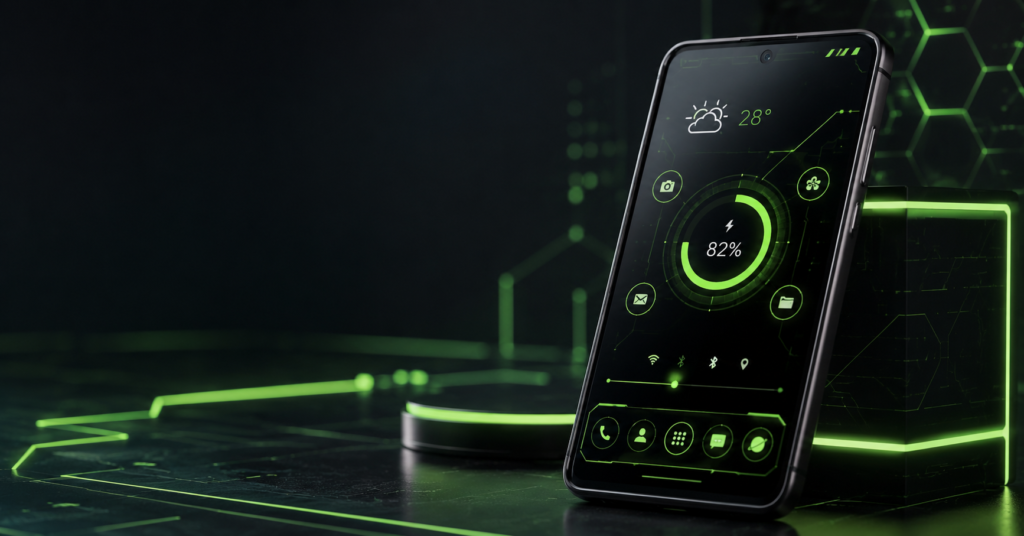
Snappy Launcher 2 is an Android launcher designed for people who enjoy futuristic-looking home screens rather than stock Android visuals. Besides changing the appearance of your device, it also combines features like app organization, app locking, hidden apps, wallpapers, widgets, and keyboard themes into one launcher. Before installing, users should verify whether replacing their current launcher fits their daily workflow and whether the included privacy features meet their expectations.
Quick Summary
Many Android launchers promise a dramatic visual makeover, but they often overlook usability. Snappy Launcher 2 attempts to balance appearance with practical tools by combining customization and everyday utility features.
Instead of installing separate apps for themes, folders, app locking, wallpapers, and icon organization, this launcher places several of those functions inside one interface.
However, choosing a launcher affects how you interact with your phone every day. That decision deserves more thought than simply picking the flashiest design.
Table of Contents
What Makes Snappy Launcher 2 Different?
Unlike launchers that focus almost entirely on icon packs, Snappy Launcher 2 aims to change the overall visual experience.
The interface follows a futuristic dashboard style with glowing icons, circular widgets, geometric layouts, and animated design elements that resemble science-fiction control panels.
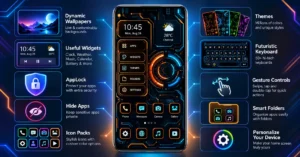
Looking beyond appearances, the launcher also includes productivity-oriented tools instead of functioning as only a visual theme.
Examples include:
- App folders
- Widget support
- Home screen customization
- App locking
- Hidden apps
- Wallpaper customization
- Theme color adjustments
- Personalized icon management
The idea is simple:
Instead of installing multiple customization apps, users may manage several personalization features from one launcher.
Why This Matters More Than Most Users Realize
Many people install launchers for appearance alone.
After a few days, they uninstall them because everyday tasks become slower.
The real question is not:
“Does it look cool?”
The better question is:

“Can I still reach everything quickly after changing my home screen?”
This is where launcher choice becomes important.
A launcher becomes the operating environment you interact with hundreds of times every day.
If navigation feels confusing, even attractive themes become frustrating.
Users considering Snappy Launcher 2 should spend time exploring:
- gesture navigation
- app drawer behavior
- search accessibility
- widget placement
- folder organization
These have a greater long-term impact than wallpaper quality.
A Small Detail Most Reviews Ignore
One overlooked benefit of an all-in-one launcher is reducing “customization fragmentation.”
Many Android users install:
- one wallpaper app
- one icon pack
- one app lock
- one widget app
- one launcher
- one folder organizer
Each may request different permissions, consume storage, and update independently.
Using a launcher that combines several customization functions may simplify maintenance for some users.
This does not automatically improve privacy, but it can reduce the number of customization apps running simultaneously.
That’s an aspect rarely discussed in launcher comparisons.
Who Should Consider Using It?
Snappy Launcher 2 may suit users who:
- Enjoy futuristic interface designs
- Frequently change themes
- Like organizing apps visually
- Prefer built-in customization features
- Want fewer separate personalization apps
It may be especially interesting for people who become bored with the standard Android home screen.
Who May Prefer Another Launcher?
Not everyone needs a dramatic interface.
Users who value:
- minimalism
- Pixel-style navigation
- extremely lightweight launchers
- stock Android appearance
may find simpler launchers more comfortable for everyday use.
Visual complexity can sometimes reduce efficiency depending on personal preference.
Features That Can Improve Everyday Use
Instead of focusing only on appearance, several practical tools deserve attention.
Built-in App Lock
The launcher includes an app locking feature.
This can reduce the need for installing a separate lock application if your phone doesn’t already provide one.
However, users should still understand whether the feature relies on launcher protection or system-level security.
Checking how the lock behaves after device restarts is worthwhile.
Hide Apps
Some users simply want a cleaner app drawer.
Others want to reduce accidental access.
Hidden apps can help organize the interface, although users should remember that hiding an app is not always the same as encrypting or securing it.
Folder Management
Good folders save time.
Instead of filling several home screen pages, grouping similar apps can reduce visual clutter.
This becomes increasingly useful as phones accumulate hundreds of installed apps.
Theme Colors
Changing theme colors affects more than appearance.
Some users naturally recognize colors faster than labels.
Assigning different color themes to work devices and personal devices may even reduce visual confusion.
Widgets
Support for widgets such as:
- clock
- calendar
- weather
- battery
- music
allows users to place useful information directly on the home screen.
The practical value depends on whether those widgets update efficiently without noticeably affecting battery life.
What Users Should Check Before Installing
Before changing your launcher, consider these points.
Backup Your Existing Layout
Many users forget this.
Changing launchers may rearrange icons differently.
Taking screenshots of your current home screen makes it easier to restore later.
Verify Permission Requests
Launchers often request permissions related to:
- accessibility
- notifications
- storage
- wallpapers
Only grant permissions you understand and actually need.
Test Gesture Compatibility
Different Android manufacturers customize gesture navigation.
After installation, check:
- Home gesture
- Back gesture
- Recent apps
- Swipe navigation
to ensure everything behaves normally.
Battery Usage
Animated themes may consume more resources than static launchers.
After several days, compare battery usage inside Android settings.
Privacy Considerations
Because launchers become part of your daily workflow, users should review:
- Privacy Policy
- Data collection practices
- Required permissions
- Accessibility access (if requested)
Remember that launcher apps interact with many parts of the home screen experience.
Reading the Play Store listing carefully before granting permissions is always recommended.
Potential Limitations
Every launcher involves trade-offs.
Possible considerations include:
- Learning curve for new layouts
- Visual design may not appeal to everyone
- Compatibility differences across Android brands
- Some customization features may overlap with built-in phone software
- Heavy visual effects could feel distracting on older devices
These aren’t necessarily problems, but they are worth evaluating before making the launcher your default interface.
Similar Alternatives
Depending on what matters most, users may also explore:
Nova Launcher
Ideal for users who prioritize flexibility and deep customization without a futuristic visual style.
Niagara Launcher
Designed for speed and minimalism with simplified navigation.
Microsoft Launcher
Good for productivity-focused users who rely on Microsoft services.
Smart Launcher
Offers automatic app organization and efficient layouts.
Each launcher emphasizes different priorities, so choosing one depends more on workflow than appearance.
Is Snappy Launcher 2 Worth Trying?
If your goal is simply changing wallpaper, this launcher may offer more features than you actually need.
If you enjoy experimenting with futuristic interfaces while also wanting integrated tools like folders, widgets, app locking, and home screen personalization, Snappy Launcher 2 is worth exploring.
The best approach is to use it for several days rather than judging it within the first few minutes.
Daily usability often matters more than first impressions.
Final Takeaway
Snappy Launcher 2 isn’t just another theme application—it attempts to combine visual customization with practical organization tools in a single launcher.
Its futuristic design will appeal most to users who enjoy changing the overall look of Android, while its built-in utilities may reduce the need for several separate personalization apps.
Before making it your default launcher, spend a little time checking navigation, permissions, battery behavior, and compatibility with your device. Those factors will have a much bigger impact on your everyday experience than the interface alone.
Frequently Asked Questions
Is Snappy Launcher 2 free to use?
The Google Play listing indicates that the app is available to download, and users should review the Play Store page for current pricing, advertisements, or optional purchases.
Does Snappy Launcher 2 work on all Android phones?
Compatibility depends on your Android version and device manufacturer. Checking the Play Store compatibility section before installing is recommended.
Does the launcher include app locking?
Yes. The developer states that the launcher includes an integrated app locking feature, though users should understand how it functions and what level of protection it provides.
Can I hide apps using Snappy Launcher 2?
According to the developer, the launcher includes an option to hide apps from the app list.
Will installing this launcher delete my apps?
No. Installing a launcher changes the appearance and navigation of your home screen but does not remove your installed applications.
Should I replace my current launcher?
If you enjoy experimenting with home screen customization and futuristic themes, it may be worth trying. If you prefer a lightweight, stock Android experience, you may want to compare it with simpler launchers first.
Is Snappy Launcher 2 available for iPhone?
Based on the information provided, this launcher is intended for Android devices.
Editorial Disclosure
IndShorts.com publishes independent app news, update explainers, mobile technology guides, and informational content.
IndShorts.com is not affiliated with Google Play, Apple, or the developer of Snappy Launcher 2 unless explicitly stated. App names, logos, trademarks, and brand names belong to their respective owners.
This article is based on publicly available information, the official app listing, and independent editorial analysis. App features, permissions, availability, and policies may change over time. Readers should verify important details through the official Google Play listing before installing or updating any application.
Related Apps & Guides
Calls Voice Changer: How Works and What to Check Before Paying
October 22, 2026 • Read MoreDevotional Wallpapers and Ringtones for Android
October 20, 2026 • Read MoreWhat Is a Mobile Vault App? How Photo & Video Vaults Really Work
October 15, 2026 • Read MoreNavratri Vibe: What to Check Before Installing
October 13, 2026 • Read MoreBattery Charging Animation: 7 Checks for Android Users
October 9, 2026 • Read MoreWhat Are VoIP and SMS Services?
October 8, 2026 • Read More✍️ About the Author – M Raj
Every website article I write is for the benefit of users (viewers). I focus on fully meeting the needs of article visitors and ensuring they are satisfied. All articles are created following Google’s article policy (Publisher Center guidelines). To get in touch, email M Raj at mraj@indshorts.com.
🧾 Editorial Standards
For corrections or clarifications, contact M Raj: keyboardtamil17@gmail.com