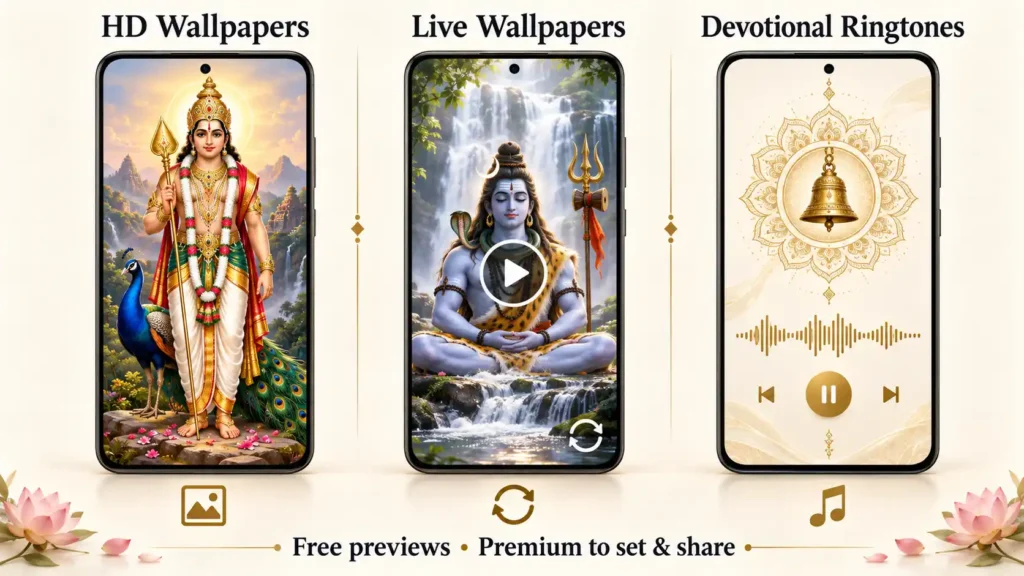
Finding a wallpaper of your favourite deity and a devotional ringtone often means browsing separate apps. Arul: Wallpapers & Ringtones brings these options together, with South Indian devotional images, live video wallpapers and audio collections organised by deity.
You can explore collections dedicated to Amman, Ayyappan, Murugan, Perumal, Sivan and temples. The app also offers multiple interface languages, including Tamil.
Before installing, there is one useful distinction to understand: browsing and previews are free, while applying wallpapers, setting ringtones and sharing content require premium access, according to the supplied app description.
What Is Arul: Wallpapers & Ringtones?
Arul is an Android personalisation app focused on devotional content. It lets users browse still images, preview moving wallpapers and listen to devotional ringtones before choosing what to use.
Instead of starting with a search box, its browsing experience centres on a scrolling feed and deity categories. This can be convenient when you know which deity’s collection you want to explore but do not have a particular image or track in mind.
| App detail | Information |
|---|---|
| App name | Arul: Wallpapers & Ringtones |
| Developer shown in the supplied Play Store screenshot | UtilityVerse |
| Platform | Android |
| Main content | Devotional wallpapers, live video wallpapers and ringtones |
| Free access | Browsing and content previews |
| Premium access | Setting wallpapers, setting ringtones and sharing |
| Interface languages listed | English, Tamil, Telugu, Kannada, Malayalam and Hindi |
This guide describes the supplied app information and screenshot. It is not a hands-on performance review.
Table of Contents
Devotional Collections Available in Arul
Arul groups its main wallpaper collection into six categories:
| Category | Collection focus |
|---|---|
| Amman | Goddess Amman devotional imagery |
| Ayyappan | Lord Ayyappan wallpapers |
| Murugan | Lord Murugan, also known as Subramanya Swamy |
| Perumal | Lord Perumal devotional imagery |
| Sivan | Lord Shiva wallpapers |
| Temples | Temple-themed backgrounds |
According to the description, each category combines still images and live video wallpapers. This lets you explore different wallpaper types without leaving your preferred deity’s collection.
Ringtones are also organised by deity. An additional Others collection includes content associated with Hanuman, Ganesha and revered gurus.
Main Features of Arul
HD God Wallpapers
Arul offers devotional images described as high resolution and composed for phone screens.
A still wallpaper is a straightforward choice if you prefer a calm background without motion. When previewing an image, check whether the deity’s face and important details remain visible behind your clock, notifications and app icons.
Screen proportions vary, so review the wallpaper on your own device before applying it. An image that looks balanced in the app preview may be cropped differently by your phone’s wallpaper controls.
Live Video Wallpapers
Live wallpapers add looping movement to the background. Arul describes these videos as silent, making them a visual feature rather than a replacement for a ringtone.
The developer describes the playback as designed with battery use in mind. However, this guide does not verify battery performance. Your experience can depend on the phone, wallpaper and time spent with the screen active.
If you prefer minimal movement or notice increased battery use, choose a still wallpaper instead.

Devotional Ringtones With Free Previews
Arul lets you listen to devotional tracks before selecting one. Its ringtone collections use deity-based organisation and kolam-inspired medallion artwork.
Previewing is especially useful for checking the opening of a ringtone. Listen for whether it starts clearly, whether the volume feels comfortable and whether you would want to hear it repeatedly during the day.
The ability to preview a ringtone for free does not mean applying it is free; setting ringtones is listed as a premium feature.
A Scrolling Feed for Browsing
The app describes a full-screen feed that users can move through with scrolling gestures. Category chips help narrow the collection to a preferred deity.
For example, someone looking for a Murugan wallpaper can choose that category and browse its still and live options together. This approach prioritises visual discovery over typing search terms.
Multiple Interface Languages
The listed interface languages are:
- English
- Tamil
- Telugu
- Kannada
- Malayalam
- Hindi
This may make navigation more comfortable for users who prefer a regional language. Interface language support should not be interpreted as a promise that every ringtone is available in all six languages.
An Expanding Collection
The description says new wallpapers and ringtones are added regularly. It does not specify an exact release schedule or a fixed number of additions.
Check the available collection before purchasing premium access, rather than subscribing only for content you expect to arrive later.
Is Arul Free or Paid?
Arul offers free browsing and previews, with premium access for personalisation actions.
| Action | Access described |
|---|---|
| Browse the collection | Free |
| Preview still wallpapers | Free |
| Preview live wallpapers | Free |
| Listen to ringtone previews | Free |
| Apply wallpapers | Premium |
| Set ringtones | Premium |
| Share content with others | Premium |
This distinction matters if you are searching for a completely free god wallpaper or ringtone app. Arul allows you to explore the content before paying, but its description places setting and sharing behind premium access.
The supplied information does not state a price or billing period. Check the purchase screen for the amount, plan duration and renewal terms before confirming.
How to Use Arul Wallpapers
The following steps follow the app’s described workflow. Actual buttons and Android confirmation screens may vary.
- Install Arul from its official Google Play listing.
- Open the app and choose an available interface language.
- Select a deity or the Temples category.
- Scroll through the collection.
- Preview a still image or live video wallpaper.
- If you want to apply it, select Set and follow any premium-access prompt.
- Choose the wallpaper destination offered by your device and confirm.
The description advertises home-screen and lock-screen options. Check the choices shown on your phone, particularly for live wallpapers, rather than assuming every wallpaper supports every destination.
How to Choose and Set a Devotional Ringtone
- Open the ringtone collection.
- Select a deity category or browse the Others collection.
- Play a preview.
- Adjust your listening volume and compare a few tracks.
- Choose the setting option for your preferred ringtone.
- Follow the premium and Android prompts shown on your device.
After applying it, check your phone’s ringtone settings and test an incoming call. This helps confirm that the selected sound is active and audible at your normal ring volume.
What to Check Before Purchasing Premium
Free previews give you an opportunity to decide whether the collection suits you. Before paying, check these practical points:
- Content choice: Are there enough wallpapers and ringtones you genuinely want to use?
- Wallpaper framing: Does the image fit around your clock, camera cutout and icons?
- Live wallpaper support: Does your device offer the destination you want?
- Ringtone quality: Is the opening clear and the sound comfortable?
- Plan terms: What does the purchase unlock, for how long, and does it renew?
- Sharing options: Does the app provide the type of sharing you need?
The description does not establish whether all content can be saved as standalone files or used offline. If either feature is essential, confirm it inside the app before buying.
Frequently Asked Questions
Can I browse Arul without buying premium?
Yes. According to the description, browsing the collection, previewing wallpapers and listening to ringtone previews are free.
Can I set wallpapers and ringtones for free?
The supplied description lists wallpaper setting, ringtone setting and sharing as premium features. Check the current in-app offer for any changes.
Does Arul include Murugan and Sivan wallpapers?
Yes. Murugan and Sivan are among its listed categories, alongside Amman, Ayyappan, Perumal and Temples.
Do live wallpapers play devotional music?
The live wallpapers are described as silently looping videos. Devotional audio is offered separately through the ringtone collection.
Does Arul support Tamil?
Tamil is one of the six listed interface languages. The others are English, Telugu, Kannada, Malayalam and Hindi.
Will live wallpapers affect battery life?
This guide has not measured Arul’s battery use. Monitor performance on your own phone and switch to a still image if you prefer a simpler background.
Does Arul work offline?
Offline availability is not confirmed in the supplied information. Do not assume every preview, wallpaper or ringtone will remain available without an internet connection.
Download Arul: Wallpapers & Ringtones
Arul brings deity-based wallpaper browsing, silent live backgrounds and devotional ringtone previews into one Android app. Its free previews are a useful starting point for deciding whether the available collection matches your preferences.
Explore the content first, check the premium terms, and choose a wallpaper or ringtone that feels comfortable in everyday use.
View Arul: Wallpapers & Ringtones on Google Play
Related Apps & Guides
What Is a Mobile Vault App? How Photo & Video Vaults Really Work
October 15, 2026 • Read MoreNavratri Vibe: What to Check Before Installing
October 13, 2026 • Read MoreBattery Charging Animation: 7 Checks for Android Users
October 9, 2026 • Read MoreWhat Are VoIP and SMS Services?
October 8, 2026 • Read MoreAndroid Car Launcher: SuperCar Launcher Explained
September 30, 2026 • Read MoreWallpaper for Girls: Is a Dedicated Aesthetic Wallpaper App Actually Useful?
September 25, 2026 • Read More✍️ About the Author – M Raj
Every website article I write is for the benefit of users (viewers). I focus on fully meeting the needs of article visitors and ensuring they are satisfied. All articles are created following Google’s article policy (Publisher Center guidelines). To get in touch, email M Raj at mraj@indshorts.com.
🧾 Editorial Standards
For corrections or clarifications, contact M Raj: keyboardtamil17@gmail.com