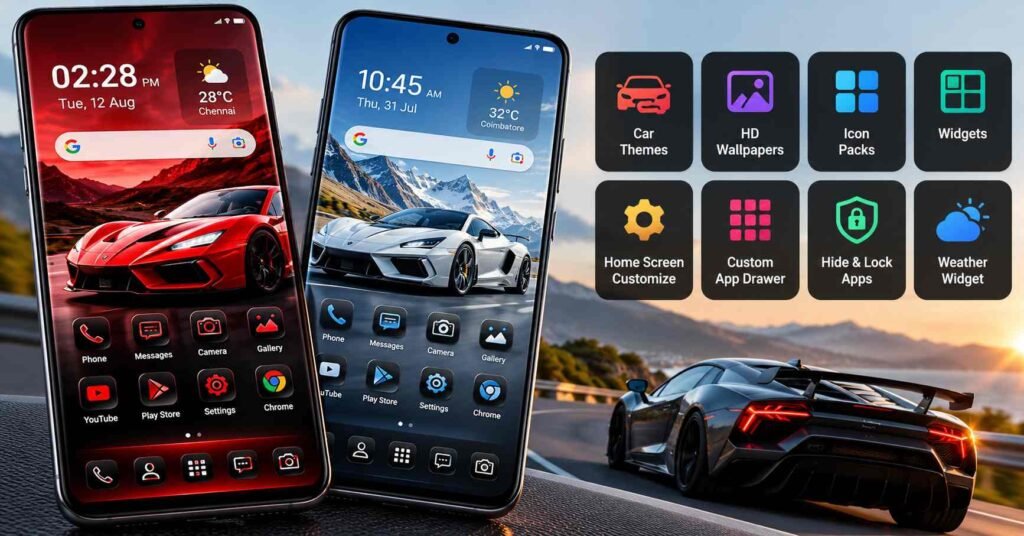
An Android Car Launcher can mean two very different things. Some apps are designed to turn a phone or Android head unit into a driving-focused dashboard. Others simply redesign the normal Android home screen with an automotive look.
SuperCar Launcher – Car Themes belongs mainly to the second category.
The app from Launchers World replaces the regular Android home-screen experience with car-inspired themes, wallpapers, icons, widgets and a customizable app drawer. Its current Google Play listing advertises 55 car themes, more than 30 built-in icon packs, widgets, app hiding and PIN-based app locking. Google Play also currently labels the app as containing ads.
That distinction matters: installing this app does not turn a phone into Android Auto, add vehicle diagnostics, connect it to a car’s ECU, or magically provide automotive navigation hardware.
Its main purpose is much simpler: make an Android phone look and behave differently at the launcher level.
Quick Summary
| Question | What users should know |
|---|---|
| What is it? | An Android home-screen launcher with a strong car/supercar visual theme |
| Is it a driving dashboard? | Not primarily; its advertised features focus on phone personalization |
| Main attraction | 55 car themes, wallpapers, 30+ icon packs and widgets |
| Does it replace the home screen? | Yes, when selected as the device’s default launcher |
| App drawer | Customizable, with grid/list-style options |
| Extra tools | App hiding and PIN-based app locking are advertised |
| Ads | Google Play currently marks it as containing ads |
| Platform | Android |
| Best suited to | Users who want a car-themed Android home screen |
| Main thing to check | Whether you like using it as your everyday default launcher |
Table of Contents
The Most Important Thing to Understand Before Installing
There is an overlooked problem with the phrase “car launcher.”
Someone searching for an Android car launcher may actually be looking for an interface to use while driving — large navigation controls, speed information, music controls, vehicle-oriented shortcuts or an Android head-unit dashboard.
SuperCar Launcher’s Play Store description emphasizes something else: themes, wallpapers, icon packs, home-screen grids, widgets, app-drawer customization and visual personalization.
So the decision is easier if you ask one question:
Do I want my Android phone to look car-themed, or do I need a dedicated driving interface?
If the answer is the first, SuperCar Launcher is relevant. If the answer is the second, you should compare dedicated automotive launcher solutions instead.
That distinction is more important than the number of wallpapers included.
What SuperCar Launcher Actually Replaces
A launcher sits unusually close to the centre of everyday Android use.
It doesn’t merely put a wallpaper behind your existing home screen. Once selected as the default launcher, it becomes the interface you repeatedly return to when you press Home.
That can affect how you:

- find apps,
- arrange icons,
- use widgets,
- open the app drawer,
- organize home-screen pages,
- access common apps,
- and navigate the phone throughout the day.
This is why evaluating a launcher only from attractive screenshots can be misleading.
A wallpaper can look impressive for five minutes. A launcher needs to remain comfortable after hundreds of taps and swipes.
What Makes This Launcher Different?
The obvious attraction is the automotive presentation.
The developer currently advertises 55 car-inspired themes, 55 high-resolution wallpapers and 30+ built-in icon packs. Themes are intended to cover supercar, sports-car and concept-car aesthetics.
But there is a more practical detail hidden behind those numbers.
The themes and icon packs are integrated into the launcher rather than being presented as a collection that requires users to separately find multiple theme components. That can make it easier to create a visually consistent setup.
A themed Android screen often looks unfinished when the wallpaper follows one design language but app icons and widgets follow another. Having these components inside the same launcher may reduce that mismatch.
The Long-Press Panel May Be More Useful Than the Car Graphics
One feature deserves more attention than it normally gets: the customization panel.
According to the current listing, long-pressing an empty part of the home screen opens controls for rearranging content, selecting themes, adding widgets, changing wallpaper, modifying home-screen settings and choosing icon packs.
That’s useful because customization apps can easily bury frequently used controls several menu levels deep.
For a launcher, how quickly you can undo or modify a customization is nearly as important as how many customization options exist.
If an icon becomes too small, a grid feels crowded or a wallpaper makes labels difficult to read, quick access to those controls reduces friction.
It Goes Beyond a Wallpaper Collection
Calling SuperCar Launcher a “car wallpaper app” would undersell what it does.
The launcher advertises controls for:
Home-screen layout: Users can adjust elements such as icon size, grid arrangement and dock visibility.
App drawer: The app page can be customized with different layouts, column arrangements and backgrounds.
Widgets: Built-in options include weather, digital and analog clocks, battery information, music and calendar widgets.
Android widgets: The developer also says normal system widgets can be added and resized.
Apps: Swipe-up access to the app drawer is supported, along with app hiding.
These are functional launcher features rather than merely decorative changes.
One Detail Car Fans Should Not Misinterpret
The screenshots and branding naturally make the app look automotive.
But a car-themed interface is not the same thing as car integration.
Based on the current Google Play description, users should not assume features such as:
- OBD-II vehicle information,
- vehicle speed telemetry,
- fuel information,
- Android Auto replacement functionality,
- steering-wheel integration,
- car-specific GPS hardware integration,
- or direct vehicle controls.
Those capabilities are not what the current Play listing advertises.
This is particularly important for people planning to install the app on a dashboard-mounted phone or an Android head unit simply because its name contains “Car Launcher.”
A Better Way to Judge the 55 Themes
The number “55” sounds impressive, but theme count shouldn’t be the main buying—or installing—criterion.
For an everyday launcher, check three less glamorous things first:
Readability: Can you instantly read app names and widget information against the car wallpaper?
Icon recognition: Do custom icons make familiar apps harder to identify?
Visual density: Does the combination of a detailed car background, widgets and themed icons make the screen feel cluttered?
A visually dramatic launcher can look excellent in a store screenshot while being less practical on a smaller phone display.
Try a theme with your real app layout, not just the demonstration layout, before deciding whether it works for you.
Widgets Could Be the More Practical Feature
The built-in widgets may provide more lasting usefulness than the visual themes.
Weather, calendar, clock, music and battery information can turn an otherwise decorative home screen into a quick-information dashboard.
The current listing says weather can be configured by setting a city.
This also gives privacy-conscious users something specific to inspect: determine how weather information works on their device rather than automatically assuming that a weather widget needs continuous precise GPS access.
Privacy: Check the Current Declaration, Not Assumptions
Google Play’s current Data safety section says the developer declares that the app does not collect data and does not share data with third parties. It also states that data is encrypted in transit. These are developer-provided disclosures, and Google itself notes that privacy practices can vary and that developers can update this information.
That means the sensible approach isn’t to label the app simply “safe” or “unsafe.”
Check the actual permission prompts presented on your phone after installation and consider whether each requested capability makes sense for a launcher feature you intend to use.
This becomes particularly relevant because the launcher advertises features such as widgets, weather, app hiding and app locking.
App Lock and Hide Apps Need a Small Reality Check
SuperCar Launcher advertises both Hide Apps and a PIN-based Lock Apps feature.
These can be useful for casual privacy, but they shouldn’t automatically be treated as equivalent to Android’s deeper device-level security mechanisms.
There is also another practical consideration: these features belong to the launcher experience.
If you later change your default launcher, uninstall the app or reset its configuration, you should not assume that the same launcher-based organization or privacy behaviour will continue unchanged.
For highly sensitive content, use the security and privacy features provided by Android or your phone manufacturer where appropriate.
What About Performance and Battery Life?
This is an area where specifications alone cannot give everyone the same answer.
Launcher performance depends on the phone, Android version, RAM availability, animations, widgets, wallpaper complexity and other installed apps.
One recent Google Play reviewer reported that their screen became “dull” after some use, while other reviews describe positive experiences. Individual store reviews are useful signals, but they are not controlled performance tests and shouldn’t be generalized to every Android phone.
A better test is to use the launcher normally for a day or two and watch for:
- delayed return to the home screen,
- widget refresh problems,
- unusual animation stutter,
- excessive battery use,
- icons reloading,
- or unexpected layout resets.
This matters more than a benchmark for an app that remains visible throughout normal phone use.
Who Should Pay Attention?
SuperCar Launcher makes the most sense for someone who enjoys car imagery and also wants deeper Android home-screen customization.
It is particularly relevant if you want a coordinated package of car wallpapers, matching icons and widgets without assembling those pieces individually.
It is less compelling if you already like your phone manufacturer’s launcher, rely heavily on proprietary launcher features, prefer an extremely minimal home screen, or were actually searching for an in-car driving dashboard.
What to Check Before Making It Your Default Launcher
Don’t immediately spend time building a complex home screen.
First, test the basics:
- Install it from its official Google Play listing.
- Set it as the default launcher when Android asks.
- Open the app drawer and find several apps you use frequently.
- Add one Android system widget.
- Test a couple of themes rather than all 55.
- Check icon and text readability.
- Lock the phone and unlock it several times.
- Restart the device and confirm your layout remains as expected.
- Check battery usage after normal use.
- Only then invest time in a full custom setup.
This approach answers the important question—whether the launcher works comfortably on your phone—before you spend an hour perfecting the appearance.
Limitations and Concerns
The biggest limitation is also the source of the app’s appeal: it is strongly themed.
Users who love automotive designs may see that as the reason to install it. Others may find the visual style less useful over time than a neutral launcher.
There are also several practical considerations.
Google Play currently identifies the app as containing ads. Google Play the Play listing does not provide enough information to conclude how intrusive those ads will feel in every usage scenario, so users should evaluate that directly.
Changing launchers can also alter workflows you have built around the original launcher. Manufacturer-specific gestures, widgets or integrations may not behave identically under a third-party launcher.
And again, users seeking a genuine dashboard-oriented car launcher should not choose purely from the name or screenshots.
Is SuperCar Launcher Worth Trying?
It deserves attention primarily as a customization launcher, not as an automotive utility.
Its combination of car themes, integrated icon packs, widgets, app-drawer controls and home-screen customization gives it more functionality than a basic car wallpaper app. The current Google Play listing confirms that these personalization features remain central to the app.
The deciding factor isn’t whether 55 themes sounds better than 20 or 30.
It is whether you want a car-centric visual identity across your everyday Android home screen.
If that’s your goal, trying the launcher and testing it with your real apps is reasonable.
If you’re searching for a launcher specifically designed around driving, navigation or an Android car head unit, compare dedicated automotive launchers instead.
How to Return to Your Old Launcher
Trying a third-party launcher does not normally mean permanently giving up your original Android home screen.
The exact menu names differ between manufacturers and Android versions, but look under an area similar to:
Settings → Apps → Default apps → Home app
Then select your previous system launcher.
Once you’ve confirmed the original home screen works normally, you can uninstall SuperCar Launcher if you no longer want it.
This is preferable to deleting it immediately while you’re still using it as the default Home app.
FAQs
Is SuperCar Launcher an Android car launcher?
Yes, but the wording needs context. It is an Android home-screen launcher with car-themed personalization. Its current feature list focuses on themes, icons, wallpapers, widgets and home-screen/app-drawer customization rather than vehicle integration.
Does SuperCar Launcher work with Android Auto?
The current Google Play description does not advertise it as an Android Auto replacement or claim Android Auto integration. Do not assume compatibility simply because the app uses “Car Launcher” branding.
Does it include car themes without separate downloads?
The developer says the launcher contains 55 car-themed setups and that its themes can be selected within the launcher without separate theme downloads.
Does SuperCar Launcher have ads?
Yes. Google Play currently labels the app as Contains ads.
Can I hide or lock apps?
The current listing advertises app hiding and PIN-based app locking. Treat those as launcher features rather than automatically assuming they provide the same protection as device-level Android security features.
Does the launcher collect personal data?
Google Play currently shows the developer’s declaration that no data is collected and no data is shared with third parties. Data-safety information is developer-provided and can change, so users should check the current listing and the permissions displayed on their own device.
Can I use normal Android widgets with it?
According to the developer’s current listing, yes. It supports system widgets in addition to its own clock, weather, battery, music and calendar widgets.
Can I remove SuperCar Launcher later?
Yes. First switch your phone’s default Home app back to the original launcher through Android Settings, then uninstall SuperCar Launcher if you no longer need it. Menu wording can vary by phone manufacturer and Android version.
Final Takeaway
The interesting part of SuperCar Launcher isn’t simply that it puts sports cars on an Android screen.
It combines the visual theme with launcher-level controls—icons, widgets, app drawer, grid settings, wallpapers, app hiding and app locking—so the car aesthetic can extend across the home-screen experience.
But “Android Car Launcher” is an ambiguous search term, and that is the key fact prospective users should understand.
SuperCar Launcher is best approached as a car-themed Android phone launcher. It should not be mistaken for a vehicle-control system, Android Auto replacement or dedicated driving dashboard.
For interested users, the most useful test is therefore not how impressive its store screenshots look. Set it as the Home app temporarily, add your real widgets and most-used apps, and see whether the design remains readable, fast and convenient during normal use.
Editorial Disclosure
IndShorts.com publishes independent app news, update explainers, mobile technology guides and informational content. IndShorts.com is not affiliated with Google Play, Google, Apple, the App Store, Launchers World or the developer of this app unless explicitly stated.
App names, logos, trademarks and brand names belong to their respective owners. Information in this article is based on publicly available sources and the Google Play listing checked on September 30, 2026. Features, advertising, permissions, privacy declarations, availability and policies can change. Readers should verify important details on the official store listing before installing.
Related Apps & Guides
Wallpaper for Girls: Is a Dedicated Aesthetic Wallpaper App Actually Useful?
September 25, 2026 • Read MoreClock Vault Hide Photos, Video: What to Know Before Trusting It With Private Files
September 20, 2026 • Read MoreClone Space-Dual Space: What Android Users Should Know Before Running Two Accounts on One Phone
September 16, 2026 • Read MoreTech Launcher for Android: What Hi-tech Circuit Launcher Actually Changes
September 6, 2026 • Read MoreCloud Free Storage: What Android Users Should Know Before Moving Their Photos
September 1, 2026 • Read MoreLists+ App: More Than a Phonebook, but Check Sync Limits and Data Access Before You Install
August 27, 2026 • Read More✍️ About the Author – M Raj
Every website article I write is for the benefit of users (viewers). I focus on fully meeting the needs of article visitors and ensuring they are satisfied. All articles are created following Google’s article policy (Publisher Center guidelines). To get in touch, email M Raj at mraj@indshorts.com.
🧾 Editorial Standards
For corrections or clarifications, contact M Raj: keyboardtamil17@gmail.com