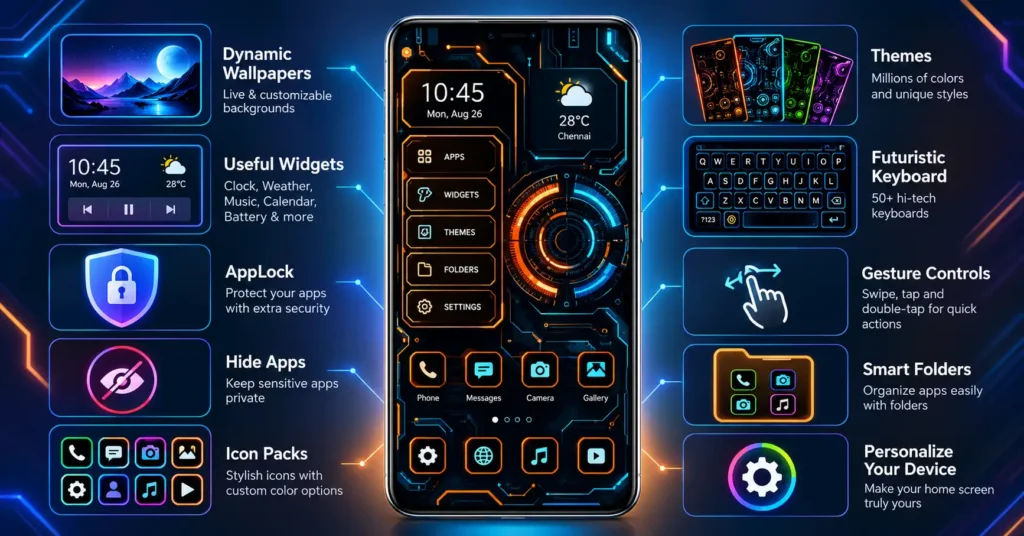
A Tech Launcher can make an ordinary Android home screen look dramatically different without replacing the phone or installing a custom operating system. Hi-tech Circuit Launcher is one example, using a circuit-board-inspired interface while combining themes, widgets, folders and privacy-oriented launcher tools.
There is also a more practical reason to look at the app now. Its current Google Play release notes say Android 16 support has been added, alongside bug and ANR fixes and performance improvements.
But the futuristic appearance is only half the story. A launcher becomes part of one of the most frequently used areas of an Android phone. That makes usability, default-app behaviour, privacy features and the ability to return to the original launcher more important than screenshots alone.
Quick Summary
Hi-tech Circuit Launcher is an Android home-screen replacement from Launchers World. Instead of simply adding a wallpaper, it changes how the home screen and app access experience look and behave.
Its main attraction is the circuit-style interface shown in its themes, icons and launcher panels. The app also advertises dynamic wallpapers, widgets, folders, gesture controls, AppLock, Hide Apps, icon customization and keyboard options.
The latest Google Play information lists Android 16 support as a recent change. The listing also says the app contains ads and offers in-app purchases.
Quick answer: This Tech Launcher is worth investigating if you want a highly stylized Android home screen rather than the conventional grid-of-icons design. Users who prefer the simplicity and predictability of their phone manufacturer’s launcher may find the additional interface unnecessary.
Table of Contents
The Important Difference: This Is More Than a Theme
This is an easy point to overlook.
A wallpaper changes the image behind your icons. An icon pack changes icon appearance. A launcher can replace the interface Android uses when you press the Home button.
That distinction matters because Hi-tech Circuit Launcher is intended to become the phone’s launcher rather than merely decorating the existing one.
The result can feel much more substantial than applying a theme. App organization, shortcuts, gestures, folders and launcher widgets can all become part of the new environment.
It also means users should approach the installation differently from installing an ordinary wallpaper app.
Before committing to it as the default Home app, spend a few minutes checking whether you can comfortably reach the apps and controls you use every day.
What Is New?
The current Google Play release notes are unusually straightforward:
- Android 16 support added
- Bugs and ANR issues fixed
- Performance improvements
ANR means Application Not Responding. In practical terms, reducing ANRs is more significant for a launcher than it might sound because an unresponsive launcher directly affects navigation around the phone.

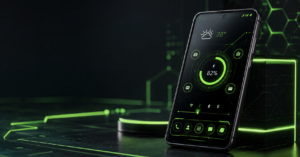
The Android 16 addition is also relevant for people using newer devices. It does not, however, mean that the launcher reproduces Android 16’s native interface or adds Android 16 features to an older phone. It means the developer reports support for Android 16 in the current app release.
That distinction prevents a potentially misleading interpretation of “Android 16 support.”
What Does the Circuit Interface Actually Do?
The strongest reason to install this launcher is visual customization.
Its interface uses a futuristic dashboard aesthetic rather than trying to imitate Pixel, Samsung or stock Android. Screenshots show prominent circuit-like lines, technical-looking panels and strongly coordinated theme colors.
Users can select different theme colors, while wallpapers and other interface elements are designed to complement that visual style.
This creates an interesting trade-off.
With many conventional launchers, the objective is to disappear into the background and make apps easy to reach. Hi-tech Circuit Launcher deliberately makes the launcher itself part of the visual experience.
That makes it more suitable for users who enjoy experimenting with their phones than someone who simply wants the fastest possible route to Gmail, WhatsApp or the camera.
The Feature Combination Is More Interesting Than the Wallpaper
The app’s scope goes beyond futuristic graphics.
According to its Play Store information, its feature set includes AppLock, Hide Apps, keyboard customization, wallpapers, color themes, weather, widgets and folders. It also advertises gesture controls and support for personalization.
That combination potentially reduces the need to install several separate customization utilities.
For example, someone could use one launcher for a circuit-style home screen, organize apps into folders, change the visual theme and use supported privacy-oriented launcher functions.
There is an important caveat: features inside a launcher should not automatically be treated as equivalent to Android’s system-level security mechanisms.
AppLock and Hide Apps Need the Right Expectations
“Hide Apps” sounds stronger than it necessarily is.
Hiding an icon from a launcher’s normal app list can improve everyday discretion, but users should not assume that this makes the installed application invisible everywhere in Android.
Similarly, an AppLock function provides an additional access barrier, but highly sensitive information should still rely on Android’s established device security and any authentication provided by the sensitive app itself.
This is especially relevant for banking, password-management and personal-document apps.
Think of launcher privacy tools as an additional convenience layer, not a replacement for the phone’s underlying security model.
Widgets Could Determine Whether You Keep the Launcher
The futuristic appearance will probably get someone to install the app. Everyday functionality will determine whether they keep it.
The developer advertises widgets covering functions such as clock, weather, battery, calendar, music and other information.
That can suit someone who wants a dashboard-like home screen rather than rows of unrelated widgets.
However, users should test their own workflow rather than judging the launcher entirely from promotional screenshots. A visually impressive dashboard becomes less useful if reaching a frequently used application requires extra taps or if a preferred widget does not behave the way it did on the previous launcher.
For a launcher, navigation friction matters more after three days than visual novelty does after three minutes.
One Detail New Users Should Know Before Installing
Installing the launcher does not permanently convert an Android phone into that interface.
Android supports selectable Home apps. If a user sets Hi-tech Circuit Launcher as the default, pressing Home can continue returning to it until another launcher is selected.
That can occasionally make people think the new design is difficult to remove.
If you decide you do not like it, look in Android Settings for the default-app/Home-app selection and choose the phone’s original launcher again. Menu wording and location vary between manufacturers and Android versions.
Only after confirming that the original home screen is active would I remove an unwanted launcher.
This simple step is worth knowing before experimenting with any third-party launcher.
What Users Should Check Before Installing
Start with the official Hi-tech Circuit Launcher Google Play listing rather than obtaining the app from an unknown APK website.
The current listing identifies Launchers World as the publisher and TIANA ENTERPRISES in the developer information. Google Play also currently labels the app as containing ads and in-app purchases.
Google Play’s Data safety section currently carries the developer’s declarations that no data is collected and no data is shared with third parties, and that data is encrypted in transit. Google explicitly notes that Data safety information is supplied by developers and can change over time.
Therefore, users should still inspect the permissions and Data safety information shown on their own device at installation time rather than relying indefinitely on an article or screenshot.
Also check which features are free before building your entire home-screen setup around them. The presence of in-app purchases means users should not assume every advertised customization option is included without payment.
A Better Way to Test a New Tech Launcher
Instead of immediately redesigning the whole phone, use it normally for a short trial.
Check whether you can quickly open your phone, camera, messages, browser and other daily apps. Test folders and gestures. Verify weather or other widgets you actually care about. Lock the screen and return several times. Restart the phone once and confirm that the home screen behaves as expected.
Most importantly, learn where Android’s Default Home app setting is located on your particular phone.
This test tells you far more about whether a launcher fits you than its screenshot gallery does.
Practical Use Cases
Hi-tech Circuit Launcher makes the most sense for someone who wants a phone to look intentionally different.
A user with a conventional Android interface may enjoy converting it into a sci-fi-style dashboard without changing ROMs or modifying Android itself. Someone who frequently changes wallpapers and icon packs may also appreciate having multiple customization controls concentrated in the launcher.
It can also appeal to users who like information-rich home screens.
The weaker use case is someone whose priority is minimalism. If the current Pixel, Samsung, OnePlus, Xiaomi or other manufacturer launcher already provides exactly the workflow you want, changing launchers solely for visual novelty may create more configuration than value.
Limitations and Concerns
The first limitation is structural: a third-party launcher does not redesign every part of Android.
Opening Settings, system permission screens, notifications and individual applications will still expose interfaces controlled by Android, the phone manufacturer or those apps. One Google Play reviewer specifically noted that the theme does not extend throughout Android’s UI.
Second, the free listing contains ads and in-app purchases.
Third, some functionality may depend on permissions or Android capabilities. Users should consider whether a requested permission makes sense for the feature they are trying to enable rather than approving every request automatically.
Finally, launcher preferences are unusually personal. An interface that feels efficient to one user can feel crowded to another.
An Overlooked Alternative: There Is a Pro Version
There is an interesting option for users comparing versions rather than simply installing the first search result they see.
Launchers World’s current Google Play catalog also lists a separate Hi-tech Circuit Launcher Pro application alongside the standard Hi-tech Circuit Launcher.
That is worth knowing before spending money through the standard app.
Do not assume that the separate Pro listing and an in-app purchase in the free edition necessarily provide identical benefits. Compare their current Play Store descriptions, pricing and features before paying because those details can change.
Launchers World also publishes several other futuristic launcher designs, so users who like the concept but dislike this particular circuit layout have alternatives from the same publisher.
Is Hi-tech Circuit Launcher Worth Trying?
Yes, for the right type of Android user.
Its appeal is strongest for people who actively want their home screen to become a futuristic dashboard and are prepared to spend some time configuring it.
It is less compelling as an upgrade for someone satisfied with a clean stock launcher.
The recent Android 16 support, ANR fixes and performance improvements are useful developments because compatibility and responsiveness matter considerably for software that controls the Home experience.
Still, there is no reason to treat a launcher installation as permanent. Try the workflow, not just the appearance. If everyday navigation becomes slower, return to your original Home app.
FAQs
Is Hi-tech Circuit Launcher available now?
Yes. Hi-tech Circuit Launcher is currently listed for Android on Google Play.
Does Hi-tech Circuit Launcher support Android 16?
The developer’s current Google Play release notes specifically state that Android 16 support has been added.
Is Hi-tech Circuit Launcher free?
Google Play provides an installable standard version, but the listing says it contains ads and in-app purchases. A separate Pro edition is also listed by the publisher.
Is it available for iPhone?
The source examined for this article is the Android version distributed through Google Play. This article does not claim an equivalent iOS version.
Does the launcher completely change Android?
No. It replaces/customizes the Home launcher experience. It should not be confused with installing another operating system, and it does not necessarily redesign system interfaces or third-party apps.
Does Hide Apps make an application completely invisible?
Users should not assume so. A launcher can hide apps from its own normal interface, but that should not be treated as equivalent to removing every trace of an installed app from Android.
Is the AppLock feature enough for sensitive applications?
It can provide another privacy layer, but users should continue using Android device security and the authentication/security features offered by sensitive applications themselves.
What should I do if I don’t like the launcher?
Select the phone’s previous launcher again under Android’s default Home-app settings. The exact menu path varies by phone. After confirming that the original launcher is working, the third-party launcher can be uninstalled if it is no longer wanted.
Final Takeaway
Hi-tech Circuit Launcher is more interesting when viewed as a different way of operating the Android home screen, rather than simply another collection of neon wallpapers.
Its circuit-board presentation is the obvious attraction, but the real buying—or installing—decision should come down to something less glamorous: whether its folders, widgets, gestures and app access make daily phone use better.
The current Android 16 support and stability-focused release notes make it particularly relevant to users testing launchers on newer Android software.
Try it if you want the futuristic experience. But before making it your permanent Home app, test your normal daily routine and know how to switch back. That is the simplest way to enjoy Android customization without turning a visual experiment into an inconvenience.
Editorial Disclosure: IndShorts.com publishes independent app news, update explainers, mobile technology guides, and informational content. IndShorts.com is not affiliated with Google Play, Google, Apple, Launchers World, or the app developer. App names, logos, trademarks, and brand names belong to their respective owners. Information is based on publicly available sources and independent editorial analysis. Features, pricing, permissions, availability and policies can change; readers should verify important details through the official app listing before installing or purchasing.
Related Apps & Guides
Calls Voice Changer: How Works and What to Check Before Paying
October 22, 2026 • Read MoreDevotional Wallpapers and Ringtones for Android
October 20, 2026 • Read MoreWhat Is a Mobile Vault App? How Photo & Video Vaults Really Work
October 15, 2026 • Read MoreNavratri Vibe: What to Check Before Installing
October 13, 2026 • Read MoreBattery Charging Animation: 7 Checks for Android Users
October 9, 2026 • Read MoreWhat Are VoIP and SMS Services?
October 8, 2026 • Read More✍️ About the Author – M Raj
Every website article I write is for the benefit of users (viewers). I focus on fully meeting the needs of article visitors and ensuring they are satisfied. All articles are created following Google’s article policy (Publisher Center guidelines). To get in touch, email M Raj at mraj@indshorts.com.
🧾 Editorial Standards
For corrections or clarifications, contact M Raj: keyboardtamil17@gmail.com