Recommended Article Type
App Safety / Privacy Explainer + Mobile Tech Guide
This search intent is primarily educational: the reader wants to know what a “mobile vault” or “mobile vault app” actually is, how it differs from simply hiding files, and what risks to check before trusting one with private photos or documents. The current Calculator-Photo & Video Vault listing is useful as a real-world example, but the article should not become a promotional review.
What Is a Mobile Vault App? How Photo and Video Vault Apps Really Work
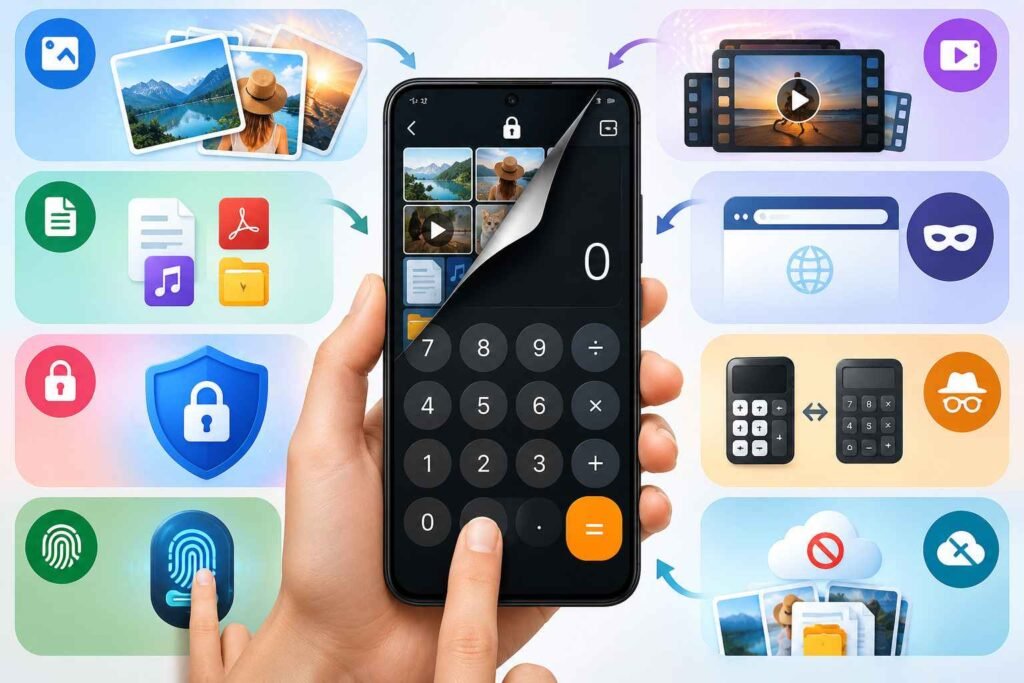
A mobile vault app is an app designed to keep selected photos, videos, documents, audio files, and other private content away from the phone’s normal gallery or file manager.
Some vault apps look like regular privacy tools. Others disguise themselves as calculators, clocks, note apps, or other everyday applications.
The important thing to understand is that a vault app does not automatically make your phone more secure.
Its real security depends on where your files are stored, whether they are encrypted, what permissions the app receives, whether third-party services are involved, and what happens if the app is deleted or the phone is lost.
Quick Summary
A mobile vault app can be useful if you share your phone with family members, lend it to others, or simply want certain photos and files hidden from the normal gallery.
A typical vault app may allow you to:
- Hide photos and videos
- Protect files with a PIN or password
- Use fingerprint or biometric access
- Organize private files separately
- Disguise the vault as another app
- Encrypt stored files
- Browse privately inside the app
However, users should not assume that hidden, PIN-protected, and encrypted all mean the same thing.
They are different levels of protection.
Before moving important or sensitive files into a mobile vault, you should check how the app stores files, how backups work, what happens after uninstalling the app, and what permissions or data access it requires.
What Is a Mobile Vault App?
There is no single Android feature officially called a “mobile vault.”
The term generally refers to a category of privacy apps that create a protected storage area inside the phone.
For example, instead of leaving a private photo visible in the normal gallery, you can import it into a photo vault app.
Depending on the app, it may then:
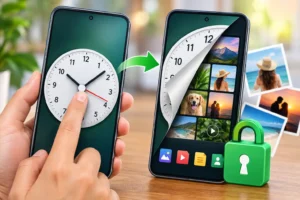

- Copy the file into protected storage
- Move it away from the normal gallery
- Encrypt the file
- Rename or relocate it
- Require a password or PIN to access it
The exact method depends on the developer.
This means two apps that both call themselves “photo vaults” may provide very different levels of privacy and security.
Hiding a File Is Not the Same as Encrypting It
This is one of the most important things to understand about mobile vault apps.
Simple Hiding
Some apps simply move files into a folder that the normal gallery does not display.
This may stop casual browsing, but technically knowledgeable users or other software may still be able to locate those files.
PIN or Password Protection
Some vault apps place a login screen in front of private files.
This adds a useful layer of privacy, but the actual security still depends on how the files are stored underneath.
Encrypted Storage
A stronger vault may encrypt files so that even if someone finds the underlying storage file, they cannot easily open the original content.
However, users should still ask important questions.
For example:
- What encryption method does the app use?
- Where is the encryption key stored?
- Can the password be recovered?
- Are thumbnails encrypted too?
- Are temporary files created while viewing media?
- Is cloud backup involved?
Simply seeing the word “encrypted” in an app description does not answer all of these questions.
Why Calculator Vault Apps Exist
One popular type of mobile vault is the calculator vault.
These apps look and work like normal calculators.
However, entering a secret PIN or sequence opens a hidden private storage area.
The main purpose is concealment.
Someone casually looking through the phone may see what appears to be a calculator instead of an obvious app named “Private Photos” or “Photo Vault.”
A good example is Calculator-Photo & Video Vault, which is currently available on Google Play.
Its Play Store listing describes features such as:
- Hidden photo and video storage
- Calculator-style disguise
- PIN protection
- Private browsing
- AES-based encryption
This is a common example of what people mean when searching for a mobile vault app.
However, a hidden calculator interface should not be confused with strong security.
The disguise mainly makes the app less obvious.
Actual file protection depends on the app’s storage and encryption design.
What Happens to a Photo When You Put It in a Vault?
This is something users should understand before importing important files.
A vault app may use one of several storage methods.
Copy and Hide
The app may create another copy inside its private storage and then ask you to delete the original.
Until the original is removed from the gallery, trash folder, cloud backup, and other synchronized locations, more than one copy may exist.
Move the Original
Some apps move the original file into app-controlled storage.
This may create a new risk.
If you uninstall the app, clear app data, reset the phone, or the app becomes incompatible, the file may become difficult or impossible to recover.
Encrypt and Store Internally
Some vaults encrypt files and keep the encrypted version inside the app’s private storage.
This can provide stronger privacy but also makes backup and password recovery more important.
Cloud Storage or Sync
Some vault apps support cloud backup or synchronization.
This may protect against phone loss, but it also means the files may no longer exist only on the local device.
Before using a vault, ask this important question:
Where will the only usable copy of my file be stored after I import it?
That question is often more important than the vault’s appearance.
One Major Risk: Losing Your Only Copy
People often think about privacy when choosing a vault app.
Data loss is just as important.
Imagine that you import years of private photos into a vault and remove the originals from the normal gallery.
Later, one of these things happens:
- You uninstall the app
- You clear the app’s storage
- You forget the PIN
- Your phone is damaged
- Your device is factory reset
- You change to another phone
- The app disappears from the Play Store
- A future Android update causes compatibility problems
If the vault does not have a reliable backup or export system, your files may become inaccessible.
For important photos or documents, never depend on a vault as the only copy until you fully understand its backup and recovery process.
What the Calculator-Photo & Video Vault Listing Shows
The current Google Play listing for Calculator-Photo & Video Vault presents the app as a privacy tool that can hide personal media behind a calculator interface.
The listing mentions:
- Photo and video hiding
- Calculator disguise
- Private browsing
- AES encryption
- Password or PIN protection
The Play Store page also indicates that the app contains advertising.
Google Play’s Data safety section should always be checked before installing any privacy-related application because it can reveal information about data collection and sharing declarations.
Users should also compare those disclosures with the app’s privacy policy.
This is especially important for a vault app because users may be storing highly personal content.
A Privacy App Can Still Use Advertising or Analytics Services
A privacy-focused app may still contain advertising, analytics, or third-party software development kits.
That does not automatically mean your private photos are being uploaded.
However, third-party services may still process other information such as:
- Device identifiers
- IP address
- App usage information
- Device type
- Operating system details
- Advertising identifiers
This is why users should not evaluate a vault only by asking:
“Does it upload my photos?”
A better question is:
What data does the app and its third-party services process while I use it?
For a privacy-focused application, this distinction matters.
What Does “Military-Grade AES Encryption” Mean?
Some vault apps use phrases such as military-grade encryption.
AES itself is a legitimate and widely used encryption standard.
However, the phrase “military-grade” is mostly marketing language unless the developer provides technical details.
Important questions include:
- Which AES mode is used?
- What key length is used?
- How is the encryption key generated?
- Is the key connected to the user’s password?
- Where is the key stored?
- What happens if the password is forgotten?
- Are thumbnails also protected?
- Are temporary decrypted files created?
A vault may use AES and still have weaknesses elsewhere.
Security depends on the entire implementation, not just the name of the encryption algorithm.
A PIN Is Only One Part of Vault Security
Many vault apps focus heavily on PIN protection.
But a PIN is only one layer.
For example, an app may have a strong six-digit PIN but still have:
- Weak file storage
- Poor password recovery
- Unprotected thumbnails
- Unencrypted temporary files
- Weak backup handling
The PIN alone does not solve those problems.
A calculator disguise is also mainly useful against casual discovery.
If someone already knows the calculator app contains a vault, the disguise provides much less protection.
Think About Who You Are Protecting Files From
Different users have different privacy needs.
A vault may be used to protect content from:
- Someone casually borrowing your phone
- Children browsing your gallery
- Friends or relatives
- Someone who knows your phone unlock code
- A stolen unlocked phone
- Malware
- A compromised online account
These are very different situations.
A basic photo vault may be sufficient for casual household privacy.
However, highly sensitive legal, financial, business, or identity documents may need stronger security than a disguised calculator app.
Check App Permissions Before Installing
Before installing a mobile vault, review its requested permissions.
Some permissions may be expected.
For example, photo access is necessary if you want to import photos.
Camera access may be reasonable if the app includes an intruder-photo feature.
However, you should question permissions that do not clearly match the app’s features.
Check access to:
- Photos and videos
- Files
- Camera
- Microphone
- Contacts
- Location
- Notifications
- Accessibility services
- Device administrator controls
- All-files access
The safest approach is simple:
Give the app only the permissions required for the features you actually use.
A Hidden Photo May Still Exist in the Cloud
This is one of the most overlooked issues with mobile vault apps.
Suppose a photo was already backed up to:
- Google Photos
- OneDrive
- Dropbox
- Samsung Cloud
- Another gallery backup service
Moving the local copy into a vault does not necessarily remove the existing cloud copy.
The image may still appear:
- On another synchronized phone
- On a tablet
- On the web version of a cloud service
- In a recently deleted folder
- In another backup
If you are trying to keep an image private, check more than the local gallery.
Review:
- Gallery
- Trash or recycle bin
- Google Photos
- Cloud backup services
- File manager
- Messaging folders
- Previously shared copies
A vault changes one storage location.
It does not automatically erase every other copy.
Private Browser Does Not Mean Anonymous Browsing
Some vault apps also include a private browser.
This can be useful for keeping browsing history separate from the phone’s normal browser.
However, “private browser” does not automatically mean complete anonymity.
Websites, internet providers, DNS providers, advertising platforms, and network administrators may still be able to observe certain activity.
In many cases, “private” simply means that the app does not keep normal local browsing history.
That is very different from being anonymous online.
What Users Should Check Before Installing a Mobile Vault
Before trusting a vault with personal media or documents, check the following.
Developer Identity
Confirm who publishes and supports the app.
Official App Store Listing
Use the official Google Play or App Store listing when possible.
Avoid unknown APK download websites.
Privacy Policy
Read what information the app and its third-party services may collect or process.
Data Safety Information
On Google Play, compare the Data safety section with the privacy policy.
Permissions
Make sure requested permissions match the app’s real features.
Storage Method
Check whether files stay only on the device or can be uploaded elsewhere.
Backup
Find out how you can recover files after phone loss or factory reset.
Uninstall Behavior
Check what happens to stored files if the app is removed.
Password Recovery
Understand what happens if you forget your PIN or password.
Export Option
Make sure you can move files back to normal storage.
Advertising
Decide whether you are comfortable using an ad-supported privacy app.
Maintenance
Check whether the app appears to be actively maintained and compatible with current Android versions.
A Smart Way to Test a Vault App
Before putting important files into a new vault, test it using non-sensitive sample files.
For example:
- Add a few test photos.
- Confirm they disappear from the normal gallery.
- Restart the phone.
- Open the vault again.
- Export the files.
- Check whether the original quality is preserved.
- Test the password recovery process if available.
- Understand what happens before clearing app data or uninstalling.
This simple test can reveal important problems before you store anything valuable.
Practical Uses for a Mobile Vault
A mobile vault can still be useful in many everyday situations.
Keeping Personal Photos Out of the Normal Gallery
This can help when showing someone other photos on your phone.
Shared Family Devices
A vault may help keep certain files private when children or relatives regularly use the device.
Separating Personal and Work Files
Some users may want to keep confidential work files away from ordinary downloads and media folders.
Protecting Copies of Important Documents
A vault may help keep scans of IDs or documents away from casual browsing.
However, highly sensitive documents should ideally be stored using a solution with strong encryption, good backup options, and a clear security model.
Limitations of Mobile Vault Apps
Mobile vault apps also have weaknesses.
Trust
You are giving private files to software created by another company or developer.
App Availability
An app may later be removed from the store or abandoned.
Password Recovery
Strong protection can become a problem if you forget the password and there is no recovery method.
Device Migration
Moving encrypted files to a new phone may not always be simple.
Metadata
Even if the main file is encrypted, thumbnails, file names, or temporary copies may still need separate protection.
False Confidence
Users may believe that hiding a photo inside a vault removes it from all backups and cloud services.
That is not always true.
Is a Mobile Vault App Safe?
There is no universal answer.
A well-designed vault can improve privacy, especially against casual access.
However, words such as:
- Vault
- Secure
- Private
- Hidden
- AES
- Calculator lock
do not automatically prove that an app is secure.
A better question is:
Is this particular vault trustworthy enough for the type of files I want to store?
The answer may depend on how sensitive your files are.
Ordinary private photos and highly confidential business or identity documents should not necessarily be treated the same way.
Is Calculator-Photo & Video Vault Worth Trying?
Calculator-Photo & Video Vault offers the type of features many people expect from a calculator-style vault.
These include:
- Hidden photo and video storage
- PIN access
- Calculator disguise
- Private browsing
- Encryption claims
For users who mainly want to keep personal media away from casual gallery browsing, this type of app may be useful.
However, privacy-conscious users should still check the current Google Play Data safety information, app permissions, privacy policy, advertising disclosures, backup behavior, and password recovery options before importing sensitive files.
A sensible approach is to test the app with unimportant media first.
Mobile Vault vs Built-In Android Privacy Features
Before installing another app, also check whether your phone already includes privacy tools.
Depending on the device, Android phones may offer features such as:
- Locked folders
- Private space
- Secure folders
- App locking
- Separate user profiles
- Hidden albums
Built-in tools can sometimes be a better option because they are integrated directly with the phone’s operating system and security model.
A third-party vault may still be useful if you specifically want features such as:
- Calculator disguise
- Private browser
- Advanced file organization
- Special vault interfaces
The best choice depends on whether your main priority is privacy, convenience, disguise, encryption, or backup.
Frequently Asked Questions
What is a mobile vault app?
A mobile vault app creates a protected area for private photos, videos, documents, and other files. Access is usually controlled through a PIN, password, fingerprint, pattern, or another authentication method.
Does a vault app really hide photos?
Usually, yes, from the normal gallery. However, the exact method varies. Some apps move files, some encrypt them, and others simply hide them from normal gallery scanning.
Are calculator vault apps real calculators?
Many calculator vault apps work like normal calculators until the correct PIN or secret sequence is entered. The hidden vault then opens.
Is a calculator vault safer than a normal photo vault?
Not automatically. The calculator appearance mainly provides disguise. Real security depends on encryption, storage, permissions, password handling, and backup design.
Can I lose photos stored in a vault?
Yes. Depending on the app, uninstalling it, clearing app data, resetting the phone, forgetting the password, or moving to a new device may make files inaccessible.
Does hiding a photo remove it from Google Photos?
Not necessarily. If the photo was already backed up to Google Photos or another cloud service, the cloud copy may remain available.
Is Calculator-Photo & Video Vault free?
The current Google Play listing shows the app as installable and indicates that it contains ads. Pricing, advertising, and other monetization details may change over time.
Does Calculator-Photo & Video Vault work on iPhone?
The app discussed here is based on its Google Play Android listing. Users should not assume that an official iPhone version exists unless they can verify a current App Store listing from the same developer.
Final Takeaway
A mobile vault app can be useful for keeping selected photos, videos, and documents away from normal gallery browsing.
However, a vault should be treated as an additional privacy layer, not as a magic security solution.
Before trusting any vault app, understand:
- Where your files are stored
- Whether they are actually encrypted
- What permissions the app requires
- What third-party services are used
- Whether cloud backup is involved
- What happens if you uninstall the app
- How password recovery works
- Whether you can safely export your files
For casual privacy, a reputable vault or your phone’s built-in private storage may be enough.
For highly sensitive or irreplaceable files, stronger security, transparent encryption, and reliable independent backups are more important than a hidden calculator interface.
Editorial Disclosure
IndShorts.com publishes independent app news, app update explainers, mobile technology guides, and informational content.
IndShorts.com is not affiliated with Google Play, the App Store, Google, Apple, Calculator-Photo & Video Vault, or any app developer unless clearly stated.
App names, logos, trademarks, and brand names belong to their respective owners.
Content is based on publicly available information, official sources where available, and independent editorial analysis.
App features, pricing, availability, permissions, developer details, privacy policies, and store disclosures may change over time.
Readers should verify important details through the official app store listing or developer source before installing an app or storing sensitive files.
Official Google Play listing:
https://play.google.com/store/apps/details?id=com.calculator.hidefile.protect
Related Apps & Guides
Fantastic Calculator Vault – Hide Photos & Videos with Total Privacy
May 15, 2025 • Read More✍️ About the Author – M Raj
Every website article I write is for the benefit of users (viewers). I focus on fully meeting the needs of article visitors and ensuring they are satisfied. All articles are created following Google’s article policy (Publisher Center guidelines). To get in touch, email M Raj at mraj@indshorts.com.
🧾 Editorial Standards
For corrections or clarifications, contact M Raj: keyboardtamil17@gmail.com