Many Android users store personal photos, videos, documents, and other private files on their phones. While Android offers several ways to organize files, it does not provide a universal folder-hiding feature across all devices.
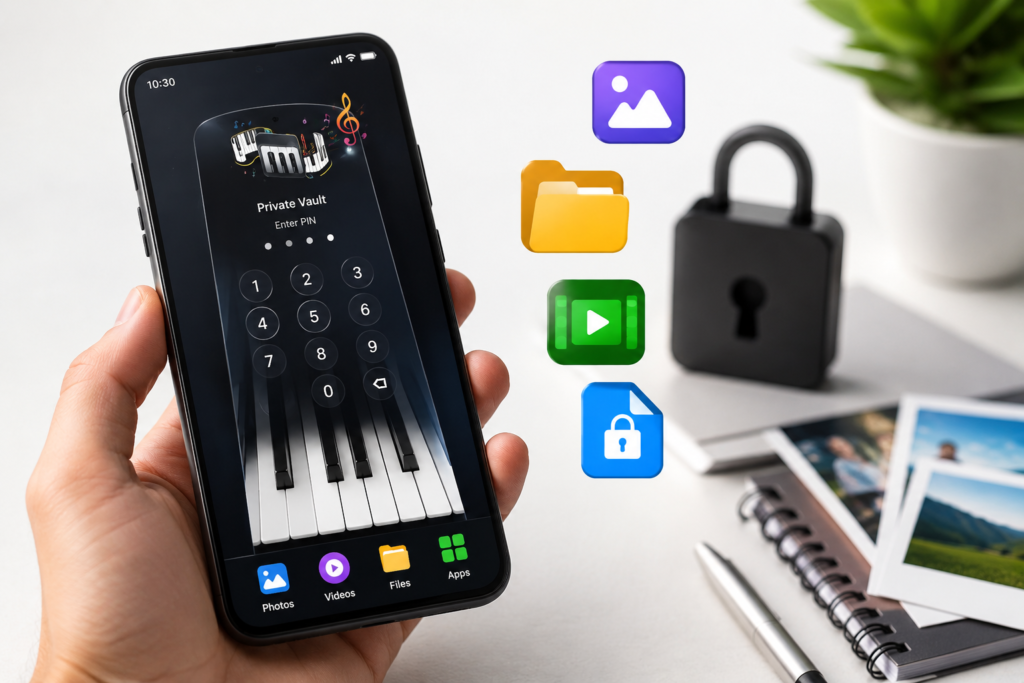
This is why privacy vault applications have become popular. Apps such as Piano Vault Hide Apps, Videos aim to help users store sensitive content inside a protected area that is hidden behind a disguised interface.
If you are searching for how to hide a folder in Android, it is important to understand what these apps actually do, when they may be useful, and what you should check before trusting them with personal files.
Table of Contents
Quick Summary
- Android devices handle folder privacy differently depending on the manufacturer.
- Some phones include built-in secure folders.
- Privacy vault apps offer an alternative method to hide files and media.
- Piano Vault Hide Apps, Videos uses a piano-style interface to help conceal private content.
- Users should carefully review permissions, backup options, and privacy policies before storing important files.
Why People Want to Hide Folders on Android
Not every hidden folder is about secrecy. In many cases, users simply want better privacy.
Common reasons include:
- Protecting personal photos
- Storing confidential documents
- Keeping work files separate
- Preventing accidental access by family members
- Organizing sensitive media
As smartphones increasingly become personal storage devices, privacy tools continue to attract attention.
What Is Piano Vault Hide Apps, Videos?
Piano Vault Hide Apps, Videos is an Android privacy application available through Google Play.
Based on its public listing, the app is designed to help users store private content inside a password-protected vault. Instead of displaying a traditional security interface, it uses a piano-themed design intended to make the vault appear less obvious.
The screenshots suggest that users can:
- Store photos and videos
- Hide files inside a private vault
- Protect content using a password
- Access files through a disguised interface
- Manage private media collections
The concept focuses on privacy through both protection and concealment.
How Privacy Vault Apps Usually Work
Most Android vault applications follow a similar process.
Step 1: Install the App
Download the app from an official source such as Google Play.
Step 2: Create a Security Lock
Users typically set:
- PIN code
- Password
- Pattern lock
Some apps may also support biometric authentication depending on device compatibility.
Step 3: Import Files
Photos, videos, or documents are moved into the private vault.


Step 4: Access Through the Vault
Instead of appearing in normal gallery apps, protected content remains inside the vault application.
The exact process varies by app and Android version.
Why This Matters
Many users assume deleting a photo from the gallery automatically secures it. In reality, privacy requires more than simply removing visibility.
A dedicated vault can provide:
- Additional access protection
- Better organization of private files
- Reduced risk of accidental viewing
- Separation from standard media apps
However, the effectiveness depends on how well the app handles security and storage.
Who Should Pay Attention?
This type of app may be useful for:
- Android users storing personal photos
- Professionals carrying sensitive documents
- Students sharing devices with family members
- Users seeking additional privacy controls
It may be less useful for people who already have access to manufacturer-provided secure folders.
What Users Should Check Before Installing
Before using any file-hiding application, review several important factors.
Storage Location
Determine whether files remain:
- On the device
- In encrypted storage
- In cloud storage
Understanding where data is stored helps reduce surprises later.
Backup Options
If the phone is lost or reset, can files be recovered?
Some vault apps include backup functionality while others rely entirely on local storage.
Permissions
Review requested permissions carefully.
Ask whether the requested access is necessary for the app’s stated purpose.
Privacy Policy
Read the privacy policy when available.
Look for information regarding:
- Data collection
- Cloud storage practices
- User account requirements
- Advertising behavior
Device Compatibility
Features can behave differently across Android versions and manufacturers.
Practical Use Cases
Personal Media Protection
Users can keep private photos separate from their main gallery.
Travel Documents
Digital copies of passports, IDs, and tickets can be organized inside a protected area.
Work Files
Professionals may use privacy tools to separate personal and business content.
Family Device Sharing
When multiple people occasionally use the same phone, vault apps may provide an additional privacy layer.
Limitations and Concerns
Privacy apps are useful, but they are not perfect.
No App Can Guarantee Complete Security
Security depends on:
- Device protection
- Operating system security
- User behavior
- Password strength
Forgotten Passwords
Some vault apps make recovery difficult if credentials are lost.
App Removal Risks
Removing an app without understanding how it stores data may affect access to protected files.
Vendor Trust
Users are placing sensitive content inside a third-party application.
This makes trust and transparency important considerations.
Alternatives to Privacy Vault Apps
Depending on your phone, built-in features may already exist.
Secure Folder Features
Some Android manufacturers offer dedicated secure storage environments.
Advantages:
- Integrated into the operating system
- Often supported by device security features
Hidden Folders in File Managers
Certain file manager applications allow folders to be hidden from standard views.
Advantages:
- Simpler setup
- No separate vault interface
Cloud Storage With Encryption
Encrypted cloud storage solutions may provide better protection for important documents.
Advantages:
- Backup protection
- Device-independent access
Is Piano Vault Worth Trying?
For users specifically searching for a way to hide folders, photos, and videos on Android, Piano Vault Hide Apps, Videos appears to offer a privacy-focused approach with a disguised interface concept.
However, users should evaluate:
- Required permissions
- Backup capabilities
- Privacy practices
- Long-term reliability
Before moving important files into any vault application, it is wise to test it with non-critical content first.
Final Takeaway
If your goal is to learn how to hide a folder in Android, there is no single solution that works identically across all devices. Some phones offer built-in secure folders, while others rely on third-party privacy applications.
Apps like Piano Vault Hide Apps, Videos provide an alternative method for storing private files behind a protected interface. The idea may appeal to users who want additional privacy for photos, videos, and documents.
Before installing any privacy app, take time to review permissions, backup options, and privacy policies. The best solution is not simply the one that hides files—it is the one that protects them responsibly while remaining easy to access when needed.
FAQs
Can I hide a folder on Android without installing an app?
Some Android devices include built-in secure folder or hidden folder features. Availability depends on the manufacturer and Android version.
Is Piano Vault Hide Apps, Videos available on Google Play?
Yes, the app is available through Google Play at the time of writing.
Are hidden files completely secure?
No. Hiding files improves privacy, but overall security depends on password strength, device protection, and the app’s security practices.
Can I hide photos and videos using a vault app?
Most privacy vault applications are designed to store photos, videos, and other personal files inside a protected area.
Should I store important documents in a vault app?
You can, but first review backup options, privacy policies, and recovery methods in case your device is lost or reset.
Do vault apps work on all Android phones?
Most support a wide range of Android devices, but specific features may vary depending on the phone model and Android version.
What should I check before installing a file-hiding app?
Review permissions, storage methods, backup support, privacy policies, and user feedback from official app stores.
Editorial Disclosure
IndShorts.com publishes independent app news, update explainers, mobile technology guides, and informational content.
IndShorts.com is not affiliated with Google Play, the App Store, Google, Apple, or any app developer unless clearly stated.
App names, logos, trademarks, and brand names belong to their respective owners.
Content is based on publicly available information, official sources where available, and independent editorial analysis.
App features, pricing, availability, permissions, and policies may change over time.
Readers should verify important details through official app store listings or developer sources before making decisions.
Related Apps & Guides
What Are VoIP and SMS Services?
October 8, 2026 • Read MoreAndroid Car Launcher: SuperCar Launcher Explained
September 30, 2026 • Read MoreWallpaper for Girls: Is a Dedicated Aesthetic Wallpaper App Actually Useful?
September 25, 2026 • Read MoreClock Vault Hide Photos, Video: What to Know Before Trusting It With Private Files
September 20, 2026 • Read MoreClone Space-Dual Space: What Android Users Should Know Before Running Two Accounts on One Phone
September 16, 2026 • Read MoreTech Launcher for Android: What Hi-tech Circuit Launcher Actually Changes
September 6, 2026 • Read More✍️ About the Author – M Raj
Every website article I write is for the benefit of users (viewers). I focus on fully meeting the needs of article visitors and ensuring they are satisfied. All articles are created following Google’s article policy (Publisher Center guidelines). To get in touch, email M Raj at mraj@indshorts.com.
🧾 Editorial Standards
For corrections or clarifications, contact M Raj: keyboardtamil17@gmail.com