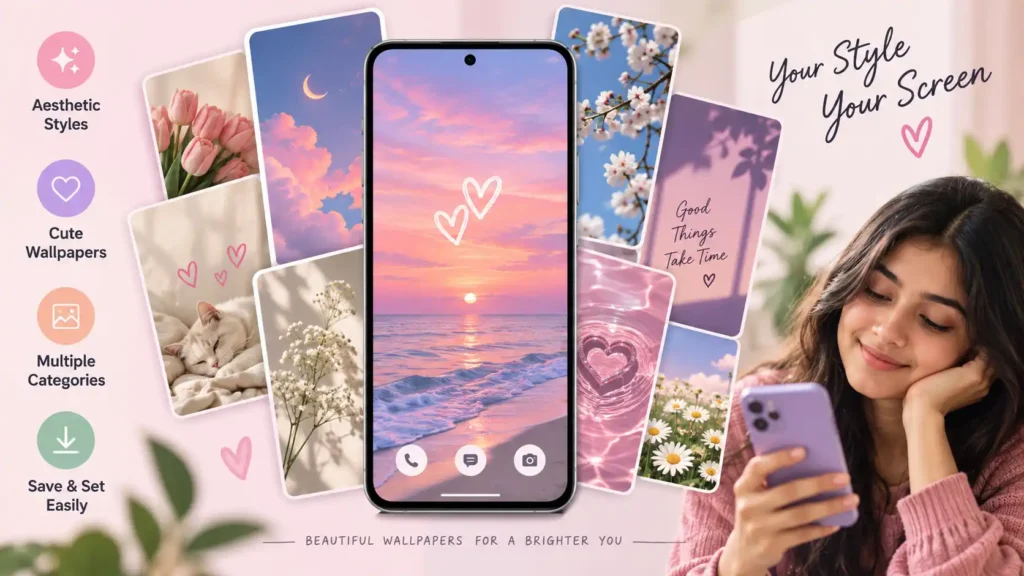
Changing a phone wallpaper sounds like one of the simplest things you can do on Android. Search for an image, save it, and set it as your background.
So why install a separate Wallpaper for Girls app?
That is the more useful question to ask about Aesthetic Wallpaper for Girls, an Android personalization app from DOSA Apps. Instead of treating wallpapers as individual images you have to find across different websites or social platforms, the app attempts to turn wallpaper discovery into a browsable collection.
The supplied Google Play listing shows categories and styles ranging from soft pastel designs to darker themes, flowers, drawings, patterns and other aesthetic backgrounds. The app also says that wallpapers can be saved and applied to the phone.
But the biggest reason to consider an app like this is not simply “more wallpapers.” It is convenience — and that convenience needs to be weighed against advertising, internet dependence, permissions and whether you actually need another app installed on your phone.
Table of Contents
Quick Summary
15–30 second answer: Aesthetic Wallpaper for Girls is an Android personalization app aimed at people who frequently change their phone background and prefer cute, pastel, artistic, dark or other aesthetic styles. Its main advantage is having multiple wallpaper styles organized inside one app rather than searching for individual images elsewhere.
It is less compelling if you only need one or two wallpapers. In that situation, installing a dedicated app may offer little long-term benefit.
The Google Play material supplied for this article also indicates that the app contains ads and offers in-app purchases, so users should check those details along with its current Data safety and permissions information before installing.
The Important Difference: A Wallpaper Library vs. a Wallpaper File
This distinction is easy to overlook.
A wallpaper image is a finished asset. Once you have downloaded a suitable image, you may not need the source again.
A wallpaper app is a discovery service. Its value therefore depends on whether you repeatedly return to it.
That creates a simple test before installing:
How often do you actually change your wallpaper?
Someone who changes the home screen every few days may benefit from categorized collections and newly added backgrounds.
Someone who changes it once every six months probably does not need a permanent wallpaper application taking up space on the phone.
This is a more meaningful way to judge the app than simply counting how many wallpapers it advertises.
What Aesthetic Wallpaper for Girls Actually Offers
The app focuses on aesthetic backgrounds rather than advanced image editing.
Based on its current public description and the supplied Play Store material, users can browse different visual styles, select a wallpaper they like, save backgrounds and use a tap-to-set function to apply them.
The screenshots also suggest that discovery is organized around recognizable visual moods rather than one uniform design.
That matters because “wallpaper for girls” is an extremely broad search.
One person may mean:
- pastel or pink backgrounds,
- floral photography,
- minimal designs,
- illustrated patterns,
- darker aesthetic images,
- preppy designs,
- quotes or typography,
- cute characters or objects.
A categorized app can reduce the amount of searching required to move between those styles.
Why Wallpaper Choice Is More Than Decoration
A beautiful wallpaper can actually be a poor phone wallpaper.
The distinction matters.
Phone screens contain icons, widgets, clocks, notifications and navigation elements. A photograph that looks excellent by itself can become visually cluttered once those interface elements are placed over it.
When choosing a background, pay attention to usable negative space.
For example, a wallpaper with its main subject positioned away from your clock and frequently used icons can make the home screen easier to read. Highly detailed patterns behind small icon labels can do the opposite.
Similarly, the lock screen and home screen do not necessarily need the same type of image.
A detailed artwork might work well on the lock screen, while a simpler background can work better behind a crowded home screen.
This is one area where browsing many options inside the same app can be genuinely useful: you can choose for screen usability, rather than selecting an image solely because it looks attractive in a preview.
AMOLED Users Should Think About the Background Differently
Users with OLED or AMOLED displays may also want to consider how a wallpaper interacts with the screen itself.
On these displays, black pixels can be turned off individually. Consequently, wallpapers containing substantial true-black areas can use less display power than very bright imagery under comparable conditions, although the real battery impact varies with brightness, screen-on time, UI elements and the particular image.
That does not mean a dark wallpaper will suddenly transform battery life.
It simply means that users who already prefer dark aesthetics may have another practical reason to consider backgrounds dominated by true black rather than bright full-screen designs.
For LCD phones, the same pixel-level advantage does not apply in the same way.
Before Saving a Wallpaper, Check Its Shape
Resolution is not the only measure of wallpaper quality.
Modern phones have tall displays, and different devices use different aspect ratios. An image can therefore be high-resolution and still crop badly when used as a wallpaper.
Before applying one, check the preview for three things:
Subject position: Does Android crop out an important face, object or text?
Clock visibility: Is the lock-screen clock readable over the image?
Icon readability: Do home-screen icons disappear into a busy or similarly colored background?
This simple preview test is often more useful than choosing a wallpaper merely because it is labelled “HD.”
What Users Should Check Before Installing
A wallpaper app does not automatically become safe or unsafe because of its category. The useful approach is to inspect what the current installation asks for.
The app’s core function logically requires the ability to set wallpaper. Publicly indexed package information also lists internet-related capabilities, notifications, advertising-related identifiers/services and wallpaper access among its permissions or components. Because these technical details can change between releases, Android users should treat the live Google Play listing and the permission prompts shown on their own device as the current reference.
There is another point worth noticing: the Play Store screenshot supplied by you identifies the app as containing ads and in-app purchases.
That does not automatically make the app problematic. It does mean the user experience should be judged on more than the quality of the pictures.
Ask whether advertisements interrupt browsing frequently, whether an optional purchase is needed for features you expected to be free, and whether notifications are genuinely useful.
If Android requests a permission that seems unrelated to selecting, saving or applying wallpapers, check why before approving it.
Don’t Confuse “Free” With “No Cost Anywhere”
An app can be free to install while still containing advertising or optional purchases.
That distinction matters particularly for simple utility and personalization apps because users may reasonably expect a straightforward free experience.
Before spending anything, check the exact offer displayed inside the app. Do not assume that an in-app purchase is permanent, recurring or required until the purchase screen clearly states its terms.
The same rule applies in reverse: the presence of “in-app purchases” on Google Play does not by itself mean you must pay to use the basic app.
One Overlooked Issue: Downloading Wallpapers Can Create Storage Clutter
The application itself is only part of the storage story.
If you repeatedly save wallpapers rather than simply applying them, the Downloads, Pictures or app-specific folders on your phone can gradually accumulate images that you no longer use.
This is especially easy to miss because individual wallpaper files may not seem important.
If you like changing backgrounds frequently, periodically check your saved images and remove duplicates and old wallpapers. Android’s storage usage is determined by more than the initial size shown for an application.
Another Issue: A Wallpaper App May Depend on Its Online Library
A locally saved wallpaper and an online wallpaper catalog behave differently.
Once an image has been saved locally and applied, you generally do not need to rediscover it every time you view your home screen. But browsing new material can depend on connectivity if that material is fetched from an online collection.
Interestingly, historical release information for this particular package described an offline mode in an earlier release, where offline wallpapers were available without internet access and both online and offline material could be presented when connected. That is historical information rather than a guarantee about the current implementation, so users should verify current behavior in the installed version.
That distinction is useful if you have limited mobile data or expect the app to work fully offline.
What Do Existing Users Complain About?
User feedback is useful when interpreted carefully.
A recent third-party aggregation of Google Play information reports positive comments about the variety and appearance of the wallpapers, but it also summarizes complaints involving loading failures, blank screens, lag, slow loading and advertising. Those are user-reported experiences, not proof that every device or current installation will have the same problems.
This is particularly relevant for a wallpaper app because browsing speed is part of the product.
A catalog containing attractive images loses much of its advantage if thumbnails or full-resolution backgrounds are slow to appear.
For that reason, users evaluating the app should pay attention to recent Play Store reviews from people with similar devices rather than relying only on the overall rating.
Practical Use Cases
The strongest use case is someone who changes the visual style of their phone regularly.
You might, for example, keep a simple pastel background during everyday use, switch to a darker wallpaper at night, choose a seasonal design during holidays, or use different lock-screen and home-screen images.
It can also be useful for someone who knows the general style they want — such as floral, pink, minimal or dark — but does not have a specific picture in mind.
In that situation, browsing a curated catalog is faster than repeatedly constructing image-search queries.
When You Probably Don’t Need This App
There is an equally valid case for skipping it.
If you already have a photograph in your gallery that you want as your background, Android itself can set that image as wallpaper.
Likewise, if you only want one aesthetic background and do not plan to keep browsing for more, installing a dedicated discovery app may be unnecessary.
This leads to a useful decision rule:
Install a wallpaper app for repeated discovery, not merely for the act of setting a wallpaper.
Android already handles the latter.
Limitations and Concerns
The application is focused on personalization rather than creating original designs, so users looking for a full wallpaper editor may find its scope limited.
Its experience can also depend on internet access for online content, and the supplied Google Play listing indicates advertising and in-app purchases.
User reports summarized by a third-party Play Store tracker also include loading and performance complaints. Those reports should be considered alongside newer reviews because app behavior can change with updates.
Finally, aesthetic preference is inherently subjective. A large collection is only valuable if its categories consistently contain styles you actually want to use.
Is Aesthetic Wallpaper for Girls Worth Trying?
It deserves attention primarily as a wallpaper discovery tool.
If you enjoy changing your phone’s appearance and want a single place to browse cute, artistic, pastel, dark and similar aesthetic backgrounds, its organized catalog can save time.
If you simply need one wallpaper, the calculation changes. A saved image plus Android’s built-in wallpaper controls may accomplish everything you need without keeping another app installed.
That is the practical dividing line.
Alternatives: You May Already Have What You Need
Before installing another application, check the tools already on your phone.
Android manufacturers commonly provide built-in wallpaper or theme controls, although the available catalog and features vary by device.
Your own photos are another alternative. A landscape, pet photo, flower, texture or intentionally blurred photograph can create a more personal home screen than a generic wallpaper library.
Dedicated wallpaper apps make the most sense when discovery and variety are the features you value.
Frequently Asked Questions
Is Aesthetic Wallpaper for Girls available on Android?
Yes. The app is listed for Android on Google Play under the package name com.Aesthetic.Wallpaper.High.Definition.Apps. The developer shown in the supplied listing is DOSA Apps.
Is Aesthetic Wallpaper for Girls free?
It can be installed from Google Play, while the supplied listing states that it contains ads and in-app purchases. Check the current Play Store and in-app purchase screens for the latest pricing and terms.
Is Aesthetic Wallpaper for Girls safe?
A store listing alone is not enough to make an absolute safety guarantee about any app. Check its current Google Play Data safety section, requested permissions, developer information and recent user feedback before installing. Avoid granting permissions that you do not understand.
Can I use the app without internet?
Some historical release information mentions offline wallpaper functionality, but that should not be treated as confirmation that every current feature works offline. If offline use is important, test it after saving the wallpapers you need.
Can I save wallpapers to my phone?
The developer’s current description says wallpapers can be saved for access on the device. Storage behavior can vary with Android version, so check where downloaded images are placed on your particular phone.
Does it work on iPhone?
The source supplied for this article is the app’s Google Play listing. Do not assume that an identically named iOS version exists merely because the Android app does. Search Apple’s App Store separately and verify the developer before installing anything with a similar name.
Do I need a wallpaper app to change my Android background?
No. Android phones already provide a way to set compatible images as wallpapers. A dedicated app mainly adds discovery, organization and access to additional wallpaper collections.
What should I check before choosing a wallpaper?
Preview the crop, home-screen icon visibility and lock-screen clock readability. For OLED/AMOLED phones, users who already prefer dark designs can also consider wallpapers containing large true-black regions.
Final Takeaway
Aesthetic Wallpaper for Girls solves a discovery problem more than a wallpaper-setting problem.
That distinction is important.
Android can already turn an image into your wallpaper. What this app adds is a browsable collection of aesthetic styles and a simpler route from finding a design to applying it.
For users who regularly refresh their phone’s appearance, that convenience may justify keeping a dedicated wallpaper app installed. For occasional users, downloading one suitable background and using Android’s built-in controls may be the cleaner option.
Whichever route you choose, do not judge a wallpaper only by how attractive its preview looks. Check how it crops on your screen, whether icons remain readable, whether the app’s advertising is acceptable, and whether its current permissions and privacy disclosures make sense for the features you intend to use.
Editorial Disclosure
IndShorts.com publishes independent app news, update explainers, mobile technology guides, and informational content.
IndShorts.com is not affiliated with Google Play, the App Store, Google, Apple, DOSA Apps, or any app developer unless clearly stated. App names, logos, trademarks, and brand names belong to their respective owners.
Content is based on publicly available information, official sources where available, and independent editorial analysis. App features, pricing, availability, permissions, and policies may change over time. Readers should verify important details through official app store listings or developer sources before making decisions.
Related Apps & Guides
Clock Vault Hide Photos, Video: What to Know Before Trusting It With Private Files
September 20, 2026 • Read MoreClone Space-Dual Space: What Android Users Should Know Before Running Two Accounts on One Phone
September 16, 2026 • Read MoreTech Launcher for Android: What Hi-tech Circuit Launcher Actually Changes
September 6, 2026 • Read MoreCloud Free Storage: What Android Users Should Know Before Moving Their Photos
September 1, 2026 • Read MoreLists+ App: More Than a Phonebook, but Check Sync Limits and Data Access Before You Install
August 27, 2026 • Read MoreIncoming Screen Theme: Features, Privacy & What to Check
August 24, 2026 • Read More✍️ About the Author – M Raj
Every website article I write is for the benefit of users (viewers). I focus on fully meeting the needs of article visitors and ensuring they are satisfied. All articles are created following Google’s article policy (Publisher Center guidelines). To get in touch, email M Raj at mraj@indshorts.com.
🧾 Editorial Standards
For corrections or clarifications, contact M Raj: keyboardtamil17@gmail.com