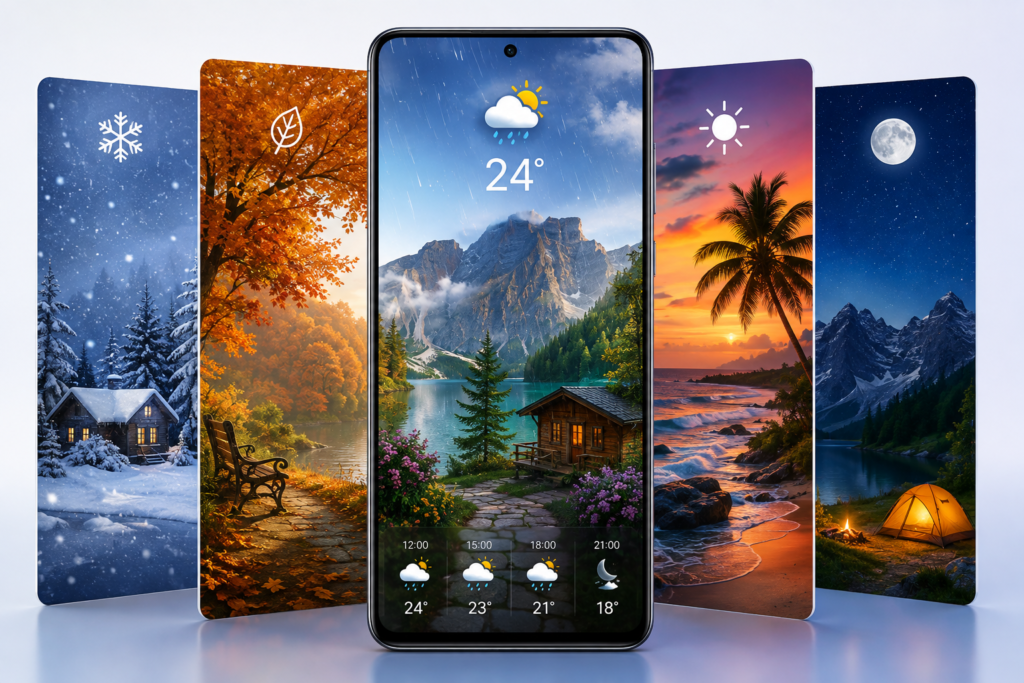
Most weather apps want you to open them.
Weather Live Wallpaper takes a different approach: it attempts to make the weather part of the Android home-screen background itself.
Rain, clouds, daylight, snow, fog and other environmental changes can become part of an animated landscape rather than remaining inside a conventional forecast widget.
That idea isn’t new. What makes the app worth looking at again in 2026 is a much less glamorous issue: reliability.
Google Play currently lists the latest change simply as “Important update for loading scenes,” with the app updated on June 6, 2026.
For a live wallpaper app, that short release note may actually be more significant than another collection of animations.
Quick Summary
15–30 second answer: Weather Live Wallpaper is an Android app from BulatSoft that combines animated landscapes with weather and time-of-day changes. The June 2026 Google Play update focuses on scene loading, an important area because a live wallpaper has little value when purchased or selected scenes fail to load reliably. The app is free to install with ads and in-app purchases, while some capabilities are tied to PRO wallpaper purchases. Before installing, users should consider battery usage, weather/location functionality, paid-scene availability and the app’s Google Play data-safety disclosure.
Table of Contents
What actually changed in the latest update?
There is an important limitation here.
BulatSoft hasn’t published a detailed technical changelog on the Play Store explaining exactly what code, servers or downloading mechanism changed. The confirmed release note is only:
“Important update for loading scenes.”
So it would be misleading to claim that every loading problem has been fixed.
There is, however, useful context.
A Google Play review dated June 4, 2026 — two days before the listed update date — reported that some previously purchased scenes had progressively become harder to load and eventually stopped loading for that user. The review does not prove why the problem occurred or that the June 6 update was specifically created for that individual issue, but the timing makes scene-loading reliability particularly relevant when evaluating the new release.
Why a “loading scenes” fix matters
With an ordinary wallpaper app, a failed image download is mostly an inconvenience.
A weather-driven live wallpaper is different.
It depends on several layers working together:
selected scene → local app → weather information → animation state → Android wallpaper service
If the scene itself doesn’t load correctly, the sophisticated weather effects behind it don’t matter.
That makes reliability arguably more valuable here than adding another visual effect.
Users who previously had trouble loading scenes have the strongest reason to make sure they’re using the current Play Store release.
This isn’t simply a weather widget with a fancy background
The more interesting way to understand Weather Live Wallpaper is as an ambient information display.
The app’s landscapes can respond to daylight and weather conditions, including effects such as precipitation, fog and cloudiness. Some scenes also represent seasonal changes. The developer says the application can use three weather forecast sources, allowing users to choose the source that appears most accurate for their location.
That’s quite different from checking a conventional weather app.
A standard weather widget might tell you:
Rain, 24°C.
An environmental wallpaper can instead make rain visually apparent whenever you unlock your phone.
It trades numerical information density for glanceable context.
That distinction determines who will actually benefit from it.
The overlooked question: do you want forecast data or weather awareness?
This is probably the most useful question to ask before installing.
If you frequently need precipitation probability, radar maps, wind speed, alerts and detailed hourly forecasts, a wallpaper should not replace a dedicated weather application.
Weather Live Wallpaper makes more sense for someone who wants their home screen to reflect the outside environment visually.
For example, a user could unlock the phone in the evening and see the landscape transition toward night, or see a scene respond to cloudy or rainy conditions.
That’s primarily an aesthetic experience with weather information layered into it.
Free and PRO don’t offer exactly the same experience
This is another detail worth understanding before deciding whether you like the app.
According to the current Play Store description, the free version can change the wallpaper’s time of day, and users can access weather information by double-tapping the wallpaper. That interface can show forecasts for the following 10 days.
Displaying current weather information directly on the desktop is described as a PRO capability. The developer also says buying a PRO wallpaper removes advertising and notes that users should reinstall the wallpaper after purchase.
That means testing only the free version may not demonstrate every part of the experience shown or described by the developer.
A sensible approach is to first test whether you like the animation style and whether the wallpaper behaves reliably on your particular phone before buying additional content.
The battery question deserves more attention than the visual effects
Animated weather wallpapers are inherently different from static JPEG or PNG wallpapers.
They can involve animation, weather refreshes and background operation.
BulatSoft provides controls intended to reduce resource use, including settings for brightness, weather notifications, additional visual particles, frame rate and sound.
The useful detail here is frame rate.
If you’re primarily interested in having an atmospheric background rather than extremely smooth animation, lowering FPS may be a worthwhile compromise.
Likewise, optional effects such as additional particles can be treated as extras rather than requirements.
Instead of asking:
“Does a live wallpaper use battery?”
A better question is:
“How much battery does this configuration use on my phone?”
Battery impact can vary with the device, display technology, selected scene, animation settings and how often the home screen is actually visible.
Android battery management can also affect reliability
There is another side to background power management.
Aggressive battery-saving behavior can interfere with apps that need to remain active.
The developer specifically warns that older Android 8/8.1/9 devices may stop the wallpaper’s background process and provides guidance concerning its persistent notification.
Modern Android devices and manufacturer-specific battery management can behave differently, so that old warning shouldn’t automatically be applied to every current phone.
Still, it highlights an important principle:
A live wallpaper can fail because of either the wallpaper app or the operating system’s background-management behavior.
If animation or weather updating repeatedly stops, investigate battery restrictions before assuming the entire service is broken.
What should users check before installing?
There are five things I’d check first.
- Weather accuracy: Compare the wallpaper’s conditions against a trusted local forecast for a few days. Since the app offers multiple forecast sources, try another source if one consistently performs poorly.
- Scene stability: Apply your preferred scene, restart the phone and use it normally. A wallpaper that looks impressive for five minutes but repeatedly disappears isn’t useful.
- Battery consumption: Compare your normal daily battery usage before and after enabling the wallpaper, particularly if you use higher animation settings.
- Paid content: Confirm which particular scene or capability you’re purchasing rather than assuming every scene becomes PRO after one purchase.
- Data safety: Understand what Google Play currently reports before giving the app access it needs.
That final point deserves its own section.
Privacy: an unusual distinction users could easily miss
Google Play’s current Data safety section says the developer declares that the app does not collect data.
On the same page, however, it says the application may share location and device or other IDs with third parties. Google Play also states that data is encrypted in transit and that data cannot be deleted.
Those statements are not necessarily contradictory.
Google Play distinguishes between data being collected by the developer and data being shared with another organization or service.
For a weather application, location is particularly relevant because location-based conditions require the application or its supporting services to determine which forecast should be displayed.
But users shouldn’t translate “no data collected” into “no data leaves the device.”
That’s the more useful interpretation of the disclosure.
Also remember that Google Play’s Data safety information is developer-provided and may change. Google itself notes that privacy and security practices can vary according to use, region and age.
Does it need your exact location?
Not every person needs hyper-local weather wallpaper behavior.
If the application offers a method that works adequately using a manually selected location or less precise location access on your device, that may be sufficient for users who don’t need highly localized conditions.
The correct choice depends on the functionality offered by the current app and Android version.
Before granting a permission, Android users should check what the permission screen actually requests rather than approving everything automatically.
Practical use cases
Weather Live Wallpaper makes the most sense in a few specific situations.
Someone who frequently checks the weather simply to decide whether conditions have changed may appreciate an ambient visual cue.
Tablet owners can potentially benefit too, since the developer states that phones and tablets are supported in portrait and landscape orientations.
It may also appeal to users who already spend time customizing launchers, widgets and home screens. For them, weather information isn’t the only purpose; having the appearance of the device change throughout the day is part of the appeal.
There are numerous environments rather than one generic sky. The Play Store description currently mentions mountain, lighthouse, seasonal, London, Paris and seashore scenes, among others.
One useful test most users probably won’t perform
After installing a live wallpaper, don’t evaluate it immediately.
Use it through:
morning → afternoon → evening → night → different weather conditions
A weather-reactive wallpaper is effectively a time-based interface.
Judging it after 10 minutes is like testing a dark-mode scheduler at noon.
Also restart the device at least once during your test.
That gives you a much better indication of whether the wallpaper remains applied and continues behaving normally after routine Android lifecycle events.
Limitations and concerns
There are several trade-offs.
The most obvious is that attractive animation doesn’t guarantee forecast accuracy. Weather data still comes from forecast providers, and results can vary by location.
Second, live wallpaper consumes more resources than a completely static background. The magnitude matters more than the fact that consumption exists.
Third, some content and functionality involve in-app purchases. Google Play currently labels the app as containing ads and in-app purchases.
Fourth, the latest release note is extremely brief. We know that the June 2026 update concerns scene loading, but the Play Store listing does not provide enough technical information to independently determine the exact scope of the change.
Finally, this remains a visual weather companion rather than a replacement for severe-weather alerts, radar or authoritative weather services.
Who should pay attention to this update?
The June release is particularly relevant for:
Existing users experiencing scene-loading problems — this is the clearest group that should check the latest version.
People who previously purchased scenes — reliability matters considerably more when content you’ve paid for is involved.
Home-screen customization fans — especially users who prefer information integrated into the visual environment rather than another widget.
Tablet users — portrait and landscape support makes the concept more useful on larger screens.
Users who prioritize maximum battery life, use plain home screens or only want detailed meteorological information have less reason to install a live wallpaper.
Is Weather Live Wallpaper worth trying in 2026?
Potentially, yes — but for the right reason.
Don’t install it expecting a revolutionary weather forecasting system.
Its distinctive value is the combination of weather + time + animated scenery.
And the latest update is noteworthy precisely because it appears focused on something mundane but essential: getting those scenes loaded.
The free experience gives users an opportunity to determine whether that concept works for them before spending money on PRO content.
For existing users who experienced loading trouble, updating is considerably easier to recommend because scene loading is the one issue the current official release note explicitly addresses.
How to uninstall Weather Live Wallpaper
If you decide the animation isn’t useful or notice unwanted battery consumption, you can remove it like another Android app.
First switch to a static wallpaper or another live wallpaper if necessary. Then open Settings → Apps → Weather Live Wallpaper → Uninstall, or uninstall it through Google Play.
If you’ve purchased content, remember that uninstalling an app and deleting a Google Play purchase are different things. Before reinstalling later, use the same Google account associated with your purchase and check the developer’s current restoration instructions.
FAQs
Is Weather Live Wallpaper available now?
Yes. Weather Live Wallpaper by BulatSoft is currently listed on Google Play for Android devices.
What changed in the June 2026 update?
Google Play’s official release note says “Important update for loading scenes.” The developer does not provide a more detailed technical explanation there, so claims beyond that would be speculative.
Is Weather Live Wallpaper free?
It is free to install, but Google Play identifies it as containing advertising and in-app purchases. The developer also offers free and PRO wallpaper functionality.
Does it show real weather?
The app is designed to use weather information to alter its landscapes and provides forecast functionality. The developer says users can choose between three forecast sources. Accuracy will still depend on the selected provider and location.
Will Weather Live Wallpaper drain the battery?
Animated wallpapers can require more resources than static wallpapers. This app includes controls such as FPS, brightness and additional-effect settings intended to help manage resource usage. Actual impact should be tested on the individual device.
Is Weather Live Wallpaper safe?
There is no basis here for declaring any app universally “safe.” The current Google Play Data safety disclosure says no data is collected by the developer, while location and device or other IDs may be shared with third parties. Users should review the current permissions and privacy information themselves before installing.
Is there an iPhone version?
The official source reviewed for this article is the Android Google Play listing. This article therefore does not claim current iOS availability.
Should existing users update?
If you have had problems loading wallpaper scenes, the June 2026 release deserves particular attention because its official release note specifically addresses scene loading. Users without that problem can still update normally, but the developer hasn’t published a detailed list of additional changes on Google Play.
Final Takeaway
Weather Live Wallpaper isn’t particularly interesting because it can animate rain or snow; Android has had animated wallpapers for years.
The more useful concept is ambient weather: allowing the appearance of your phone to communicate changing conditions without requiring you to consciously open a forecast app.
Its June 2026 update also provides a useful reminder about apps like this. Visual sophistication is secondary to reliability. If a scene cannot remain available, weather effects and realistic animation don’t matter.
For new users, the sensible approach is therefore simple: try the free experience, test weather accuracy, observe battery use over a full day, restart the phone once, and verify that your chosen scene remains reliable before buying additional content.
For existing users affected by scene-loading problems, the latest update is much more directly relevant.
Official source: Weather Live Wallpaper on Google Play
Editorial Disclosure
IndShorts.com publishes independent app news, update explainers, mobile technology guides, and informational content.
IndShorts.com is not affiliated with Google Play, the App Store, Google, Apple, BulatSoft, or any app developer unless clearly stated. App names, logos, trademarks, and brand names belong to their respective owners.
Content is based on publicly available information, official sources where available, and independent editorial analysis. App features, pricing, availability, permissions, privacy disclosures, and policies may change over time. Readers should verify important details through official app-store listings or developer sources before making decisions.
Related Apps & Guides
Wallpaper for Girls: Is a Dedicated Aesthetic Wallpaper App Actually Useful?
September 25, 2026 • Read MoreClock Vault Hide Photos, Video: What to Know Before Trusting It With Private Files
September 20, 2026 • Read MoreClone Space-Dual Space: What Android Users Should Know Before Running Two Accounts on One Phone
September 16, 2026 • Read MoreTech Launcher for Android: What Hi-tech Circuit Launcher Actually Changes
September 6, 2026 • Read MoreCloud Free Storage: What Android Users Should Know Before Moving Their Photos
September 1, 2026 • Read MoreLists+ App: More Than a Phonebook, but Check Sync Limits and Data Access Before You Install
August 27, 2026 • Read More✍️ About the Author – M Raj
Every website article I write is for the benefit of users (viewers). I focus on fully meeting the needs of article visitors and ensuring they are satisfied. All articles are created following Google’s article policy (Publisher Center guidelines). To get in touch, email M Raj at mraj@indshorts.com.
🧾 Editorial Standards
For corrections or clarifications, contact M Raj: keyboardtamil17@gmail.com