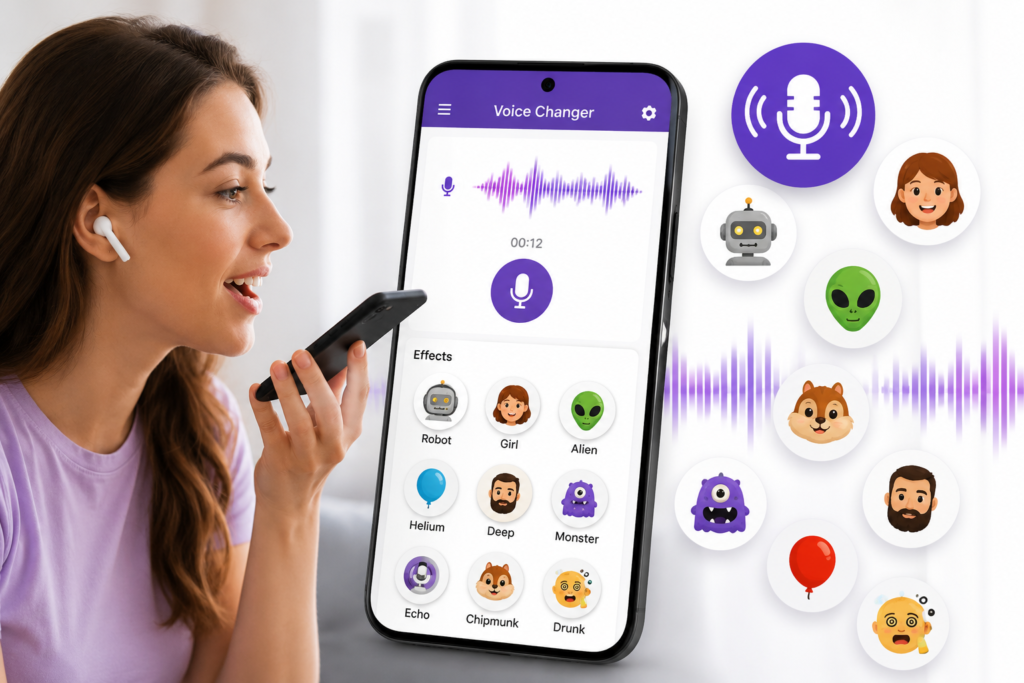
Voice-changing apps continue to attract users who enjoy creating entertaining audio clips, prank recordings, custom ringtones, and social media content. One app gaining attention in this category is Voice Changer With Effects, an Android application from RoboArt Mobile that focuses on transforming recorded audio with a wide range of sound effects.
Rather than acting as a professional audio production suite, the app is designed to make voice editing accessible to everyday users through simple controls and a large collection of voice filters.
Quick Summary
Voice Changer With Effects is an Android app that allows users to record audio, apply different voice effects, modify existing audio files, and share the results.
According to the app’s public listing, it includes:
- More than 50 voice effects
- Voice editing tools
- Audio file support
- Video audio modification
- Text-to-speech conversion
- Sharing and ringtone creation features
The app appears to target casual users who want entertaining voice transformations rather than advanced audio engineers.
Table of Contents
What Makes This Voice Changer App Different?
Many voice changer apps focus only on a few novelty filters. Voice Changer With Effects aims to offer a broader collection of sound styles.
Some of the available effect categories include:
Character-Inspired Effects
Users can experiment with voices that resemble:
- Robots
- Android-style voices
- Aliens
- Zombies
- Ghost-like effects
- Monster-style sounds
These effects may be useful for entertainment videos, gaming communities, and social media content.
Animal-Inspired Effects
The app also includes animal-themed sound transformations such as:
- Cat
- Dog
- Bird
- Wolf
- Lion
- Elephant
These effects are primarily intended for fun and creative projects.
Classic Voice Filters
Several familiar voice effects are available, including:
- Helium voice
- Deep voice
- Giant voice
- Cartoon-style effects
- Distorted voice filters
These remain some of the most popular voice-changing options among casual users.
Beyond Voice Effects: Audio Editing Features
One aspect that may interest users is the inclusion of additional audio controls.
The app listing mentions support for:
Pitch Adjustment
Pitch controls can help create:
- Higher voices
- Deeper voices
- Character-style voices
- Customized sound profiles
Echo and Reverb
These effects can add more depth to recordings and make audio sound larger or more dramatic.
Bass and Treble Controls
Users who want more control over how recordings sound may appreciate basic tone adjustments.
Additional Audio Processing
The developer also mentions:
- Compressor tools
- Harmonizer effects
- Tremolo
- Flanger effects
While casual users may not use every option regularly, they provide more flexibility than many basic voice changer apps.
Why This Matters
Voice-changing technology is no longer limited to entertainment.
Many users now create:
- Short-form videos
- Gaming content
- Podcasts
- Audio memes
- Voice notes
- Personalized ringtones
Having multiple editing options inside one app can reduce the need for several separate tools.
For users who occasionally create content for social media or messaging apps, this convenience can be valuable.
Who Should Pay Attention?
This app may be worth exploring if you:
Create Social Media Content
Short videos often benefit from unique voice effects that help content stand out.
Enjoy Audio Experiments
Users who like testing different sounds and voice styles may find plenty of options to explore.
Want Custom Ringtones
The app includes options for saving processed audio as ringtone or notification sounds.
Share Voice Clips Frequently
Built-in sharing features may simplify sending recordings through messaging platforms.
Practical Use Cases
Creating Funny Voice Messages
Users can record short messages and transform them before sending them to friends.
Producing Social Content
Creators may use altered voices for:
- Comedy videos
- Storytelling clips
- Character voices
- Meme content
Personalized Notifications
Custom sounds can be created from edited recordings.
Experimenting With Audio Ideas
The app can serve as a lightweight tool for testing voice concepts before moving to more advanced software.
What Users Should Check Before Installing
Before downloading any voice changer app, it is worth reviewing a few important details.
Permissions
Check the permissions requested by the app through the Google Play listing.
Common permissions may involve:
- Microphone access
- Storage access
- Media file access
Only grant permissions you are comfortable providing.
In-App Purchases
The Play Store listing indicates that the app includes in-app purchases.
Users should review available free and paid features before making any purchase decisions.
Device Compatibility
Performance may vary depending on:
- Android version
- Device hardware
- Available storage
- Audio processing capabilities
Older devices may experience different results compared to newer smartphones.
Privacy Information
Always review the privacy information available on the official app listing before installing.
Limitations and Potential Concerns
Although the app offers numerous effects, there are a few considerations.
Effects May Vary in Quality
Voice-changing results often depend on:
- Recording quality
- Microphone quality
- Background noise
- Device processing power
Not every effect will sound equally convincing.
Not a Professional Studio Tool
Users seeking advanced audio production features may still require dedicated audio software.
Learning Curve
With many effects and editing controls available, some users may need time to discover which combinations work best.
Alternatives Worth Exploring
Users interested in voice modification may also consider:
Voice Changer Plus
Known for a straightforward approach to voice effects.
Voicemod
Popular among streamers and gamers, though feature availability varies by platform.
AudioLab
Offers broader audio editing functionality beyond simple voice changing.
Dolby On
Focused more on recording quality improvements than entertainment effects.
The best option depends on whether the goal is fun voice effects, content creation, or more advanced audio editing.
Is It Worth Trying?
For users looking for a simple Android voice changer with a large collection of effects, Voice Changer With Effects appears to offer a reasonable set of tools.
The combination of:
- Multiple effect categories
- Audio editing controls
- File import support
- Video audio modification
- Sharing options
makes it more versatile than many basic novelty voice changer apps.
However, users should approach it as an entertainment and casual content creation tool rather than a professional audio production solution.
Final Takeaway
Voice Changer With Effects focuses on making voice transformation easy and accessible for Android users. Its wide variety of effects, editing controls, and sharing features make it suitable for people who enjoy experimenting with audio, creating fun recordings, or producing light social media content.
Before installing, users should review permissions, compatibility, privacy details, and any in-app purchase information available through the official Google Play listing. For casual voice editing and creative experimentation, the app may be worth a look, especially for users interested in real-time voice changer experiences and voice effect tools.
Frequently Asked Questions
Is Voice Changer With Effects available now?
Yes. The app is currently listed on Google Play for supported Android devices.
Is Voice Changer With Effects free?
The app can be installed from Google Play, but the listing indicates that in-app purchases are available.
Does the app support audio files?
According to the public listing, users can modify existing audio files in addition to recording new audio.
Can I use the app for social media content?
Yes. Users may create voice clips and share them through supported platforms.
Does it work on Android phones?
The app is designed for Android devices available through Google Play.
Can I create custom ringtones?
The app listing mentions the ability to save processed audio as ringtones and notification sounds.
Is it a professional audio editing tool?
No. It appears to be primarily focused on voice effects, entertainment, and basic audio customization.
What should I check before installing?
Review permissions, privacy information, compatibility details, storage requirements, and any in-app purchase information shown on the official app listing.
Editorial Disclosure
IndShorts.com publishes independent app news, update explainers, mobile technology guides, and informational content.
IndShorts.com is not affiliated with Google Play, the App Store, Google, Apple, RoboArt Mobile, or any app developer unless clearly stated.
App names, logos, trademarks, and brand names belong to their respective owners.
Content is based on publicly available information, official sources where available, and independent editorial analysis.
App features, pricing, availability, permissions, and policies may change over time.
Readers should verify important details through official app store listings or developer sources before making decisions.
Related Apps & Guides
Android Car Launcher: SuperCar Launcher Explained
September 30, 2026 • Read MoreWallpaper for Girls: Is a Dedicated Aesthetic Wallpaper App Actually Useful?
September 25, 2026 • Read MoreClock Vault Hide Photos, Video: What to Know Before Trusting It With Private Files
September 20, 2026 • Read MoreClone Space-Dual Space: What Android Users Should Know Before Running Two Accounts on One Phone
September 16, 2026 • Read MoreTech Launcher for Android: What Hi-tech Circuit Launcher Actually Changes
September 6, 2026 • Read MoreCloud Free Storage: What Android Users Should Know Before Moving Their Photos
September 1, 2026 • Read More✍️ About the Author – M Raj
Every website article I write is for the benefit of users (viewers). I focus on fully meeting the needs of article visitors and ensuring they are satisfied. All articles are created following Google’s article policy (Publisher Center guidelines). To get in touch, email M Raj at mraj@indshorts.com.
🧾 Editorial Standards
For corrections or clarifications, contact M Raj: keyboardtamil17@gmail.com