Searching for a “Phone number location tracker” can create the wrong expectation. The name sounds as though you can type someone’s mobile number and immediately see that person moving on a map.
That is not what this particular Android app says it does.
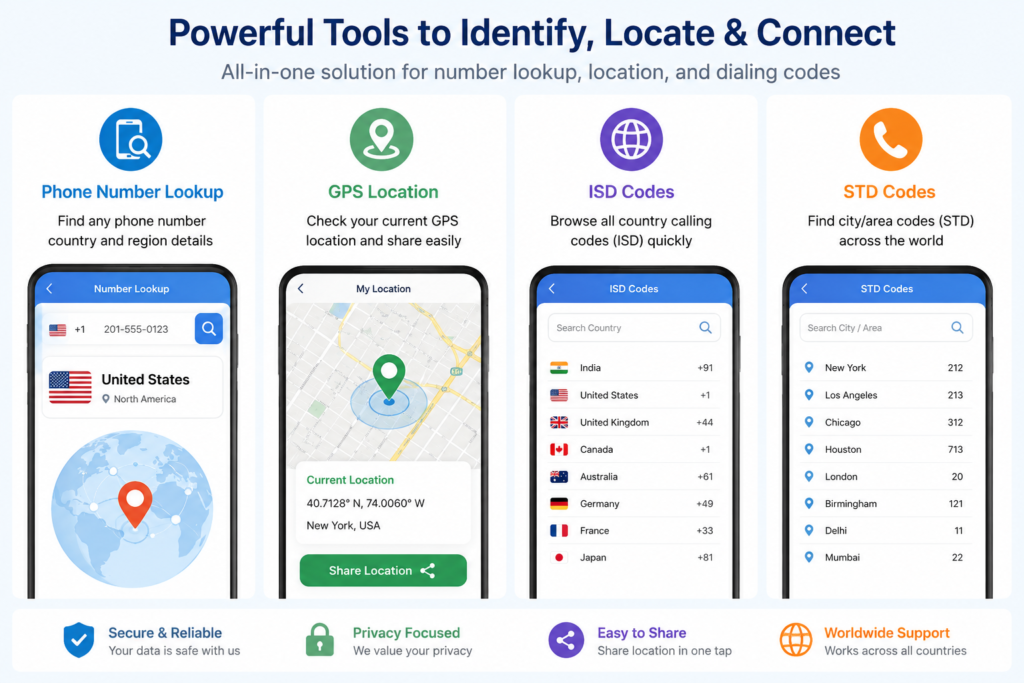
Phone number location tracker by Leading Apps Hub is primarily a number-information and area-code lookup tool. According to its Google Play listing, it can use a phone number to identify information such as its country or region. It also includes a separate feature for displaying your own device’s current GPS location.
Understanding that difference is important before installing the app.
Quick Summary
The simplest way to understand Phone number location tracker is to separate its two location-related functions:
Phone number → country/region information
and
Your phone’s GPS → your current location
These are not the same technology.
The developer specifically states that the app does not reveal another phone number owner’s live location. Its number lookup relies on information such as international and regional dialing codes.
The app is currently listed on Google Play for Android, contains ads and in-app purchases, and is categorized under Maps & Navigation.
Table of Contents
Can It Track Someone’s Exact Location From Their Phone Number?
This is probably the most important question for anyone finding the app through search.
No — not according to the app’s own description.
The Google Play listing says the application only shows the country and region associated with a phone number and does not disclose the location of a phone-number owner without permission.
That means users should not interpret results such as a country or region as the person’s present physical location.


![Quick & Sharp Search Hidden Camera Detector App for Android [2025 Review + How It Works]](https://indshorts.com/wp-content/uploads/2025/04/Quick-Sharp-Search-Hidden-Camera-Detector-App-for-Android-2025-Review-How-It-Works-300x164.png "Quick & Sharp Search Hidden Camera Detector App for Android [2025 Review + How It Works] 3")
For example, there is a major difference between:
“This number is associated with this country or numbering region”
and
“This person is currently standing at this location.”
A phone-number lookup may help with the first question. It does not automatically answer the second.
This distinction is easy to overlook because terms such as “location tracker,” “number locator,” and “GPS location” appear together.
How Does the Phone Number Lookup Work?
The app’s description indicates that users select a country code and enter the number they want to check. The application then uses international area-code information to determine a corresponding country or region.
This is better thought of as number-prefix interpretation rather than real-time GPS tracking.
That matters because a telephone number is not a live GPS coordinate.
A number can tell a lookup system something about how that number was issued or structured. It does not necessarily tell you where the phone — or its owner — is physically located right now.
This becomes particularly important with people who travel, retain an old number after moving, use roaming, or otherwise use a number outside its original geographic context.
So even when a country or region result is technically correct for the number, users should avoid treating it as proof of a person’s current location.
What Does the GPS Feature Actually Locate?
There is another location feature in the app, but it serves a different purpose.
The developer says the application can access the current GPS location of your own device and display coordinates. That location can then be shared, for example, when you are travelling or need to tell someone where you are.
This explains an apparent contradiction that users may notice:
If the app cannot GPS-track another person using a phone number, why does it request location access?
Because the GPS functionality is intended to determine the location of the device on which the app is running, rather than convert an arbitrary phone number into another person’s GPS position.
That is a much more useful way to evaluate the app’s location permission.
Other Tools Included in the App
Phone number lookup is only part of the application.
The Google Play description also lists ISD code information. ISD codes are international dialing codes used when calling numbers in different countries.
There is also an STD/city-area-code lookup feature.
These tools may be useful when you receive an unfamiliar number, need to understand a dialing prefix, or want to find an international or regional calling code.
For many users, therefore, the application is closer to a combination of a number-prefix lookup, dialing-code reference and personal GPS-location utility than a conventional person-tracking application.
One Privacy Detail Users Should Not Miss
There is an important detail buried deeper than the app’s headline features.
According to the developer’s disclosure, a phone number that you manually enter for lookup can be transmitted to the developer’s server so that the lookup can be performed.
That changes the privacy question users should ask.
Instead of only asking:
“Does this app know my location?”
you should also consider:
“Am I comfortable submitting the phone number I am searching for to an online service?”
The developer’s privacy policy says user-entered phone numbers are processed for lookup and says they are not stored or shared. However, users should still understand that server-side processing is different from an entirely offline lookup performed only on the phone.
If the number is sensitive, this distinction may matter to you.
Permissions Deserve Attention Too
The developer’s privacy policy describes more than location access. It lists potential permissions associated with functions including precise/approximate location, internet access, camera, notifications, phone-state access and some call-related or overlay functionality.
That does not automatically mean every permission will be requested from every user at the same time.
However, it does mean you should review the permissions actually requested on your Android device instead of approving them automatically.
A practical rule is simple:
Match the permission to the feature you intend to use.
Location permission makes sense when using your own GPS-location feature. A camera permission should have a clear camera-related purpose. Call-related access deserves separate consideration if you do not plan to use a corresponding feature.
Android users can review or revoke permissions later through the phone’s app settings.
What Google Play’s Data Safety Section Says
There is another point worth checking before installation.
At the time this article was researched, Google Play’s Data safety section stated that the app may share certain data types with third parties and may collect personal information. It also stated that data is encrypted in transit.
Google Play additionally displayed “Data can’t be deleted” in the listing’s Data safety summary.
Meanwhile, the developer’s separate privacy policy says users can request data deletion by contacting the developer.
Those statements deserve attention because they are not immediately intuitive when read together.
They do not necessarily prove a privacy problem — Google Play’s standardized Data safety categories and a developer’s broader privacy-policy procedures can describe different situations — but privacy-conscious users should read both disclosures and seek clarification from the developer if deletion rights are important to them.
A Phone Number Result Is Not Identity Verification
Another overlooked limitation concerns identity.
Even if a lookup returns useful information about a number, that should not be treated as proof that the caller is genuinely who they claim to be.
A country or regional match does not verify:
- the caller’s identity,
- their present location,
- whether a call is legitimate,
- whether a business really owns the number,
- or whether a message is trustworthy.
For suspicious calls involving payments, bank accounts, passwords or one-time codes, verify the sender independently using an official channel.
A number-location app should be treated as an informational aid, not an authentication system.
When Could Phone Number Location Tracker Be Useful?
The app makes more sense when its capabilities are viewed realistically.
It may be useful if you want to understand the likely country or numbering region behind an unfamiliar number, look up ISD or area codes, check your own GPS coordinates while travelling, or quickly share your own current location.
It is much less suitable if your goal is secretly following another person’s movements or locating a lost phone solely by entering its telephone number.
For a lost device, an account-linked device-finding service is generally a more appropriate category of tool because the device itself participates in the location system.
What Should You Check Before Installing?
Before installing Phone number location tracker, check the current Google Play listing rather than relying only on screenshots or old articles.
Pay particular attention to:
- Permissions requested on your device. Decide whether each permission makes sense for the features you plan to use.
- Data Safety information. Check what the current Play Store disclosure says about collection and sharing.
- Privacy policy. Remember that the developer says manually entered numbers can be transmitted to its server for lookup.
- Ads and purchases. Google Play identifies the application as containing ads and in-app purchases, so users should not assume the complete experience is necessarily ad-free or entirely without paid options.
- Accuracy. Do not make an important personal, financial or safety decision solely from a number-location result.
These checks are more useful than simply asking whether a locator app “works.”
Is Phone Number Location Tracker Safe?
There is not enough independent evidence to make a blanket statement that any application is completely safe.
What can be evaluated are its published disclosures.
The application has an official Google Play listing and a developer privacy policy. The policy explains several categories of information and permissions and identifies third-party services used by the app.
Users should nevertheless make their own decision based on the permissions presented by Android and the latest Google Play Data safety information.
The fact that a number submitted for lookup may be transmitted to a server is particularly relevant for privacy-conscious users.
Is It Worth Trying?
Phone number location tracker may deserve attention if your expectation is modest: identifying number-related country or regional information, finding dialing codes, and checking or sharing your own GPS location.
It is unlikely to satisfy someone expecting a “type any mobile number and watch that person live on a map” service.
In fact, the app’s own disclaimer is one of the most useful things to know before installing it: the number-location component is limited to country and regional information rather than another person’s precise location.
Knowing that upfront can prevent both unrealistic expectations and inappropriate use.
Frequently Asked Questions
What is Phone number location tracker?
It is an Android application from Leading Apps Hub that provides phone-number lookup information based on country or regional dialing information. It also provides tools such as ISD/STD code lookup and a feature for checking the current GPS location of your own device.
Can I find someone’s live location using their mobile number?
The developer says no. Its Google Play description states that the app shows country or regional information associated with a number and does not disclose another number owner’s location without permission.
Does the app use GPS?
Yes, it offers a GPS feature for determining the location of the device on which the app is being used. This should not be confused with locating another person’s phone simply from their number.
Does the app send searched phone numbers to a server?
According to the developer’s disclosure, a phone number entered for a lookup is transmitted to its server for processing. Its privacy policy says user-entered numbers are processed in real time and are not stored or shared.
Is Phone number location tracker free?
Google Play lists the application for installation and identifies it as containing ads and in-app purchases. Users should check the current listing and any purchase screens for the latest pricing details.
Is Phone number location tracker available for Android?
Yes. The application is currently listed on Google Play for Android. No iPhone App Store listing was supplied for this article, so iOS availability should not be assumed.
Can the result tell me exactly where a person is?
No. Country or region information derived from a telephone number should not be interpreted as a person’s current physical position.
What should I check before installing it?
Review its current Android permissions, Google Play Data safety section, privacy policy, ads or purchase terms, and whether its actual country/region lookup capability matches what you need.
Final Takeaway
The biggest thing to understand about Phone number location tracker is what the word “location” means in this context.
For a number you enter, the application is designed to provide country or regional information associated with the number. For GPS, it can determine your own device’s location when you grant the necessary permission.
Those are fundamentally different functions.
If all you need is number-origin information, dialing-code reference tools, or your own GPS coordinates, the app may be useful. If you are expecting precise live tracking of another person’s phone simply by entering their mobile number, this is not the functionality the developer claims to provide.
Before installing, the most important checks are not flashy map screenshots. They are the current permissions, the Data safety disclosure, what happens to numbers submitted for lookup, and whether the app’s actual limitations match your reason for using it.
Editorial Disclosure: IndShorts.com publishes independent app news, update explainers, mobile technology guides, and informational content. IndShorts.com is not affiliated with Google Play, the App Store, Google, Apple, Leading Apps Hub, or any app developer unless clearly stated. App names, logos, trademarks, and brand names belong to their respective owners. Content is based on publicly available information, official sources where available, and independent editorial analysis. App features, pricing, availability, permissions, and policies may change over time. Readers should verify important details through official app store listings or developer sources before making decisions.
Related Apps & Guides
Android Car Launcher: SuperCar Launcher Explained
September 30, 2026 • Read MoreWallpaper for Girls: Is a Dedicated Aesthetic Wallpaper App Actually Useful?
September 25, 2026 • Read MoreClock Vault Hide Photos, Video: What to Know Before Trusting It With Private Files
September 20, 2026 • Read MoreClone Space-Dual Space: What Android Users Should Know Before Running Two Accounts on One Phone
September 16, 2026 • Read MoreTech Launcher for Android: What Hi-tech Circuit Launcher Actually Changes
September 6, 2026 • Read MoreCloud Free Storage: What Android Users Should Know Before Moving Their Photos
September 1, 2026 • Read More✍️ About the Author – M Raj
Every website article I write is for the benefit of users (viewers). I focus on fully meeting the needs of article visitors and ensuring they are satisfied. All articles are created following Google’s article policy (Publisher Center guidelines). To get in touch, email M Raj at mraj@indshorts.com.
🧾 Editorial Standards
For corrections or clarifications, contact M Raj: keyboardtamil17@gmail.com