Quick Summary
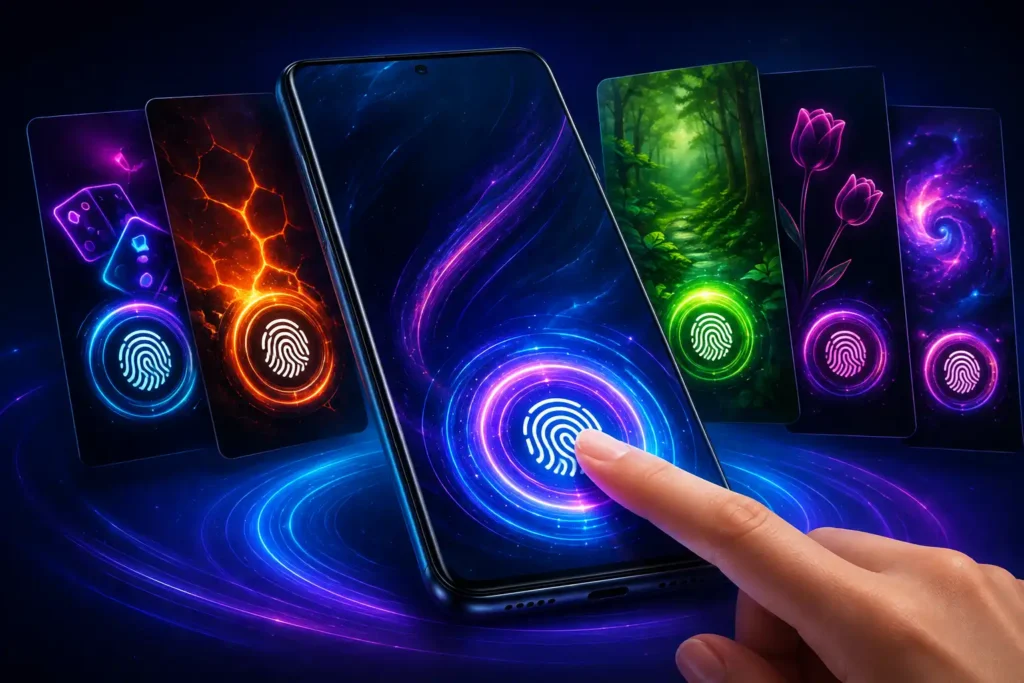
Fingerprint Live Animation App is an Android personalization app from One Music Player that combines animated fingerprint-style effects with wallpapers and visual customization. Its latest Google Play release notes mention new animations, new wallpapers, live wallpapers, UI/UX improvements, and minor bug fixes.
The important detail, however, is easy to overlook: a fingerprint animation is not automatically the same thing as your phone’s real biometric fingerprint interface.
Android manufacturers tightly integrate fingerprint authentication with the device’s hardware and system software. A third-party personalization app may therefore create an animation or lock-screen-style visual experience without replacing the secure biometric system built into the phone.
That distinction should be the first thing users understand before installing or paying for this type of app.
What Has Changed in Fingerprint Live Animation App?
The current Google Play listing says the app was updated on July 2, 2026. Its release notes identify five changes:
- New animations
- New wallpapers
- Live wallpapers
- UI/UX enhancements
- Minor bug fixes
The listing also describes controls for changing animation styles, speed, colors, themes and wallpapers.
This makes the update more interesting to users who treat their lock screen as part of their phone’s visual identity rather than simply as a security screen.
But there is a more useful way to evaluate the app than counting how many effects it offers.
Table of Contents
The Most Important Question: Does It Change Your Real Fingerprint Scanner?
This is where users can easily misunderstand apps carrying names such as “Fingerprint Animation” or “Fingerprint Lock Screen.”
Your phone’s actual fingerprint authentication is a security function involving the fingerprint sensor, Android’s biometric framework and manufacturer-specific system components.
A visual animation is a different layer.
For example, an Android phone with an under-display fingerprint reader may already display a manufacturer-designed animation when you place your finger on the sensor. A third-party personalization app cannot simply be assumed to replace that system-level biometric implementation.
So users should think of Fingerprint Live Animation App primarily as a personalization product unless their particular device and the app explicitly demonstrate deeper integration.
This distinction matters because an attractive glowing fingerprint graphic can look like a working scanner even when the graphic itself is not performing biometric authentication.
The Google Play listing uses terminology including “fingerprint lock,” “unlock” and “security features.” However, users should verify exactly how those functions behave on their own device rather than assuming the animation itself provides biometric security.

Why Fingerprint Animations Can Behave Differently Between Phones
This is one of the biggest practical issues with this category of app.
Android phones do not all use the same fingerprint technology.
Some phones have an optical under-display fingerprint sensor. Others use ultrasonic technology, a side-mounted sensor integrated into the power button, or a rear-mounted physical sensor.
That means a glowing fingerprint animation positioned near the bottom of the display makes much more visual sense on a phone with an in-display fingerprint reader than on a handset whose fingerprint sensor is located on its side.
Screen dimensions, display cutouts, lock-screen restrictions, Android version and manufacturer customizations can also affect the experience.
Consequently, screenshots showing a perfectly aligned animation should not be treated as a guarantee that every Android device will look identical.
A Detail Many Users May Miss: Animation Timing Matters More Than Graphics
There is another issue that is rarely considered when choosing this kind of personalization app.
A fingerprint animation can be visually impressive while still feeling artificial if it does not synchronize naturally with your interaction.
Ideally, users expect something like this:
finger touches fingerprint area → animation responds → authentication completes → phone unlocks
If the visual effect instead behaves independently of the actual biometric event, the illusion becomes much less convincing.
A Google Play reviewer, for example, complained that the animation appeared to run continuously rather than visibly reacting to the actual fingerprint interaction. That is an individual user report rather than proof of how the app behaves on every supported device, but it highlights an excellent test for prospective users.
Don’t evaluate only how attractive an animation looks in a preview.
Check whether it feels connected to the way you actually unlock your phone.
Live Wallpaper Changes the Equation
The addition of live wallpapers is more significant than it might initially sound.
A static wallpaper generally has very little ongoing visual processing once displayed. Live wallpapers can contain continuously changing or animated elements.
That creates another consideration: battery and display behavior.
The developer describes the app as optimized for battery efficiency. However, real-world battery impact can still vary according to the wallpaper, device, display technology, refresh rate, Android power management and how frequently visual effects are active.
Users interested primarily in fingerprint effects should therefore test the phone for a day with their preferred configuration rather than enabling every animated feature simultaneously.
If battery consumption noticeably changes, switching from a live wallpaper to a static background while keeping only the desired animation may be the more practical setup.
Who Is This App Actually For?
Fingerprint Live Animation App makes the most sense for users who enjoy changing the visual appearance of Android.
It may particularly appeal to people who already use custom wallpapers, launchers, charging animations, edge-lighting effects or lock-screen customization.
It is much less important for someone looking purely for stronger phone security.
If your objective is security, your device’s built-in PIN, password, pattern and biometric authentication remain the features you should evaluate first.
Think of fingerprint animation as visual customization, not as an automatic security upgrade.
What Users Should Check Before Installing
The current Google Play listing shows that the app contains ads and offers in-app purchases. Users who simply want to experiment with a fingerprint effect should therefore first determine what is available without payment and what requires premium access.
Another useful check is the app’s Data safety section.
At the time checked, Google Play states that the developer declares no data collected, while also declaring that device or other IDs may be shared with third parties. The listing additionally says data is encrypted in transit and that data cannot be deleted. These declarations are supplied by the developer through Google Play’s Data safety system.
That combination is worth reading carefully rather than reducing privacy to a simple “safe” or “unsafe” label.
Before installing, also check the permissions Android actually requests. Ask whether each permission makes sense for the feature you intend to use.
And if the app asks for a powerful permission or system-level capability, read Android’s explanation before approving it rather than automatically tapping Allow.
Free Version vs Premium: Test First
Google Play confirms that the app contains advertising and in-app purchases.
This makes testing especially important.
One Play Store reviewer complained about being shown a premium/free-trial offer early in the experience and about advertising in the free version. The developer responded that ads are normally part of the free version while Premium removes ads and unlocks additional features.
That doesn’t mean every user will dislike the monetization model.
It does mean you should avoid purchasing solely because an animation looks attractive in promotional screenshots.
First confirm that your preferred effect displays correctly on your phone.
Also check the current trial terms and subscription or purchase price shown by Google Play before confirming any transaction, since pricing and offers can change.
A Better Way to Test a Fingerprint Animation App
Instead of judging the app in the first minute, try a simple real-world test.
Choose one animation and use the phone normally for several unlock cycles. Check whether the animation appears in the right location, whether it responds naturally, whether it interferes with notifications or the normal lock screen, and whether unlocking feels slower or more complicated.
Then lock and unlock the phone under different conditions.
Try after restarting the device. Try when the display has been off for a while. Check how it behaves with Always-On Display if your phone supports it.
Finally, verify that removing the visual customization returns the device to its normal lock-screen behavior.
That tells you far more about compatibility than a promotional screenshot.
Limitations and Concerns
The biggest limitation is expectation.
The phrase “fingerprint animation” can suggest that an app modifies the phone’s actual fingerprint sensor experience. On Android, however, biometric authentication and decorative screen effects are not necessarily the same system.
Compatibility can also vary significantly between manufacturers.
A visual effect that looks natural on one handset may appear differently on another because fingerprint sensor placement, display size, Android skin and lock-screen behavior differ.
Advertising and premium features are another consideration. Users who dislike frequent commercial interruptions should test the free experience before deciding whether the personalization is valuable enough to pay for.
Finally, release notes such as “minor bug fixes” and “UI/UX enhancements” do not identify the exact bugs corrected or interface elements changed. We therefore cannot responsibly claim that a specific compatibility or performance problem has been fixed unless the developer documents it.
Is Fingerprint Live Animation App Worth Trying?
Yes—if your goal is personalization and you understand what you are installing.
The combination of fingerprint-style effects, wallpapers and newly listed live wallpapers gives users another way to make an Android phone visually distinctive.
But don’t install it expecting an animation alone to transform or improve the physical fingerprint sensor.
The best approach is simple:
Install → test a free effect → verify alignment and interaction → inspect permissions → observe battery behavior → only then consider premium features.
That order can prevent users from paying for a visual effect that does not behave as expected on their particular device.
Frequently Asked Questions
What is Fingerprint Live Animation App?
It is an Android personalization app that offers fingerprint-themed visual effects along with wallpapers and customization options. The current Google Play listing also mentions live wallpapers.
Does Fingerprint Animation replace my phone’s real fingerprint sensor?
Do not assume so. Your device’s real biometric authentication is handled through Android and the phone’s fingerprint hardware. A fingerprint-themed animation may function primarily as a visual customization layer.
Is Fingerprint Live Animation App available on Android?
Yes. The app currently has an official Google Play listing for Android.
Is the app completely free?
The Google Play listing identifies the app as containing ads and in-app purchases. The exact offers and prices should be checked directly in Google Play before purchasing.
Is Fingerprint Live Animation App safe?
An app should not be declared universally “safe” solely from its store listing. Google Play currently shows developer-provided Data safety declarations including no data collected and possible sharing of device or other IDs. Users should review the latest Data safety information, privacy policy and requested permissions themselves.
Will Fingerprint Animation work on every Android phone?
The experience may vary. Fingerprint sensor position, Android version, manufacturer software, display configuration and system restrictions can influence how this type of personalization behaves.
Will fingerprint animations drain my battery?
Visual effects and particularly live wallpapers can require additional resources, although the actual impact depends on the phone and configuration. The developer describes the app as battery-efficient, but users should verify battery performance on their own device.
What should I check before paying for Premium?
Test the animation on your device first. Confirm its placement and behavior, see what the free version includes, check advertising, review permissions, and read the current trial and billing terms displayed by Google Play.
Final Takeaway
Fingerprint Live Animation App is more interesting when viewed as an Android personalization tool rather than as a replacement for your phone’s biometric technology.
Its recent release notes add more animations, wallpapers and live wallpapers while also mentioning UI/UX improvements and bug fixes.
But the feature users should examine most carefully isn’t the number of glowing fingerprint designs.
It is how convincingly those effects integrate with their particular phone.
If the animation aligns properly, behaves naturally, doesn’t create unwanted battery or lock-screen issues, and the free/premium model suits you, it can be an enjoyable customization.
If you’re looking for stronger fingerprint security, however, focus on your phone manufacturer’s built-in biometric system rather than the appearance of the animation.
Official source:
Editorial Disclosure
IndShorts.com publishes independent app news, update explainers, mobile technology guides, and informational content.
IndShorts.com is not affiliated with Google Play, the App Store, Google, Apple, One Music Player, or any app developer unless clearly stated.
App names, logos, trademarks, and brand names belong to their respective owners.
Content is based on publicly available information, official sources where available, and independent editorial analysis. App features, pricing, availability, permissions, and policies may change over time.
Readers should verify important details through official app store listings or developer sources before making decisions.
Related Apps & Guides
Android Car Launcher: SuperCar Launcher Explained
September 30, 2026 • Read MoreWallpaper for Girls: Is a Dedicated Aesthetic Wallpaper App Actually Useful?
September 25, 2026 • Read MoreClock Vault Hide Photos, Video: What to Know Before Trusting It With Private Files
September 20, 2026 • Read MoreClone Space-Dual Space: What Android Users Should Know Before Running Two Accounts on One Phone
September 16, 2026 • Read MoreTech Launcher for Android: What Hi-tech Circuit Launcher Actually Changes
September 6, 2026 • Read MoreCloud Free Storage: What Android Users Should Know Before Moving Their Photos
September 1, 2026 • Read More✍️ About the Author – M Raj
Every website article I write is for the benefit of users (viewers). I focus on fully meeting the needs of article visitors and ensuring they are satisfied. All articles are created following Google’s article policy (Publisher Center guidelines). To get in touch, email M Raj at mraj@indshorts.com.
🧾 Editorial Standards
For corrections or clarifications, contact M Raj: keyboardtamil17@gmail.com