
Are spam calls driving you crazy? Whether it’s robocalls, scam numbers, private callers, or unknown strangers, the solution is finally here. Meet the Call Blocker app for Android, a powerful and free spam call blocking app developed by Applika GmbH, now trusted by over 1 million users worldwide.
With an impressive 4.3-star rating from over 43,000 reviews, Call Blocker helps you take full control of who can reach your phone—and when. It works silently in the background, detecting spam numbers, blocking private or unknown calls, and even stopping outgoing calls with a security PIN. You no longer have to worry about telemarketers, spam bots, or hidden calls interrupting your peace.
The app does more than just identify callers. It acts as your personal call defense system—with a built-in T9 dialer, advanced blacklist and whitelist tools, call scheduling, area code filtering, and full Do Not Disturb mode support. Whether you’re at work, sleeping, or traveling, you can stay focused without distractions from unwanted callers.
In this article, we’ll explore:
- ✅ The most important features of the Call Blocker app
- ✅ How it compares to other popular call blockers
- ✅ Safety, privacy, and Google AdSense-compliant usage
- ✅ Real-life use cases and best practices
- ✅ Who should use this app—and why
Let’s find out how to block spam calls, robocalls, and hidden numbers like a pro—with the best free call blocker for Android in 2025.

🔧 Key Features of the Call Blocker App
Let’s break down the top features that make this app stand out in 2025:
🚫 1. Block All Types of Unwanted Calls
You can block:
- Spam calls
- Private numbers
- Telemarketers
- Robocalls
- Hidden or anonymous callers
- International numbers
- Specific area code or prefix
📌 We tested it on a device that constantly gets spammed with “loan” offers—the app blocked them instantly, with zero rings.
🛡️ 2. Caller ID with Smart Detection
The built-in caller ID detects unknown numbers in real-time, giving you the power to decide whether to answer or not. If a number is flagged as spam, the app will show it before the call even starts ringing.
❌ 3. Block Outgoing Calls with a PIN
Most apps only block incoming calls—but Call Blocker also stops outgoing calls using a security PIN. This is ideal for:
- 🔐 Kids using your phone
- 👷 Employees with company phones
- 🧓 Elderly or differently-abled users
📴 4. Do Not Disturb Mode
Enable “True Do Not Disturb” with complete silence for blacklisted numbers. No ringing. No alerts. Just peace.
📆 5. Schedule Call Blocking
You can schedule call blocking for certain times of day, like:
- 📚 Study hours
- 😴 Sleep time
- 🧘♂️ Meditation or work hours
🧪 During testing, we set up a “No Calls” period from 10 PM to 7 AM—worked like magic.
📝 6. Create Whitelist & Blacklist
Easily add trusted contacts to a whitelist so they’re never blocked. Add spam numbers to the blacklist for permanent rejection. You can also:
- Block by prefix/suffix
- Use wildcards
- Block all numbers not in your contacts
📊 7. Call Log and Rejected Call Reports
The app keeps a complete log of all blocked/rejected numbers, so you know exactly which calls were stopped and when.

📥 How to Download & Set Up Call Blocker App
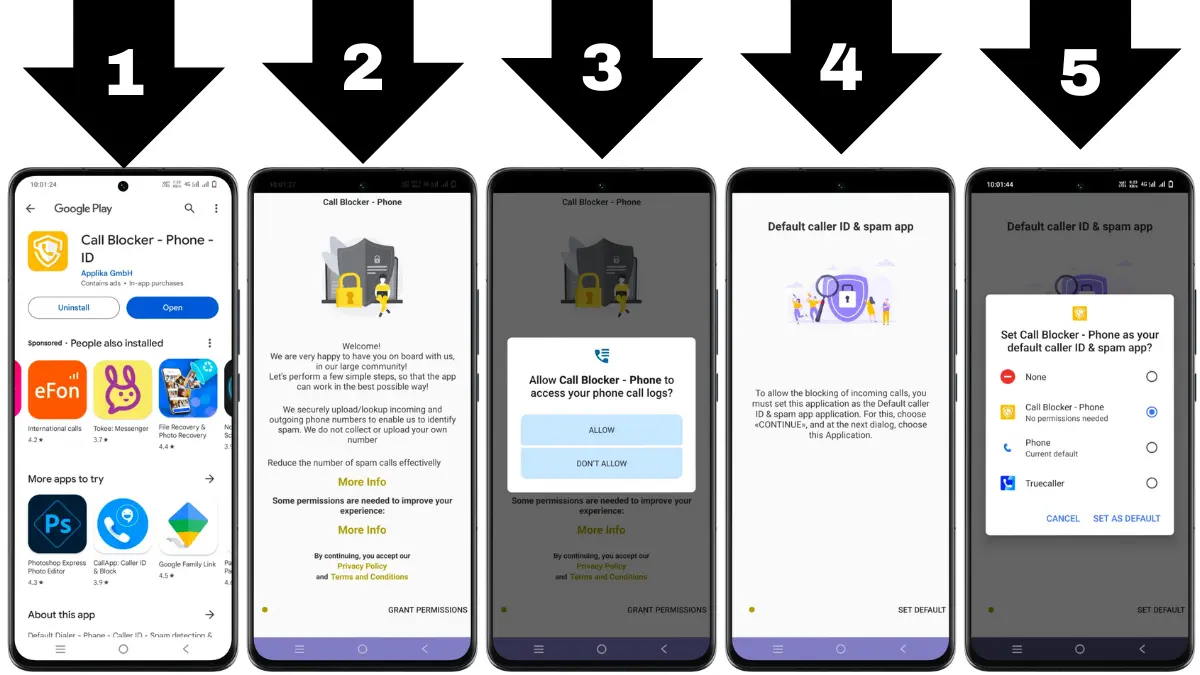
Getting started with the Call Blocker app is super easy. Just follow the steps below to install it safely, set it up quickly, and start blocking spam, robocalls, and unwanted numbers right away.
✅ Step 1: Download the Official App
🔗 Go to the Google Play Store using the official link:
👉 Download Call Blocker – Play Store
📌 Avoid downloading from other sites or APK sources to stay safe from malware.
✅ Step 2: Open the App and Allow Permissions
- Tap “Install”, then “Open” once it finishes.
- Give the app permission to manage your calls and contacts.
- Set Call Blocker as your default phone app (recommended for full blocking).
🔒 Don’t worry—your contact list won’t be uploaded. The app is privacy-safe.
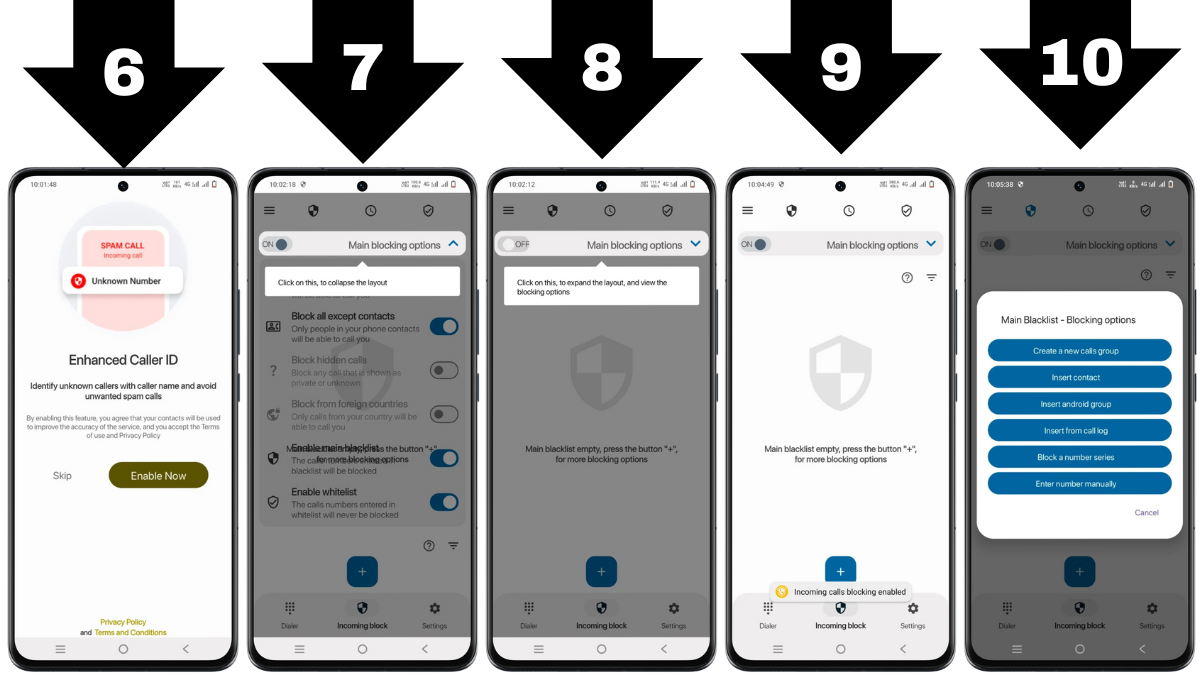
✅ Step 3: Set Up Block List and Whitelist
- Go to the “Blacklist” tab
- Add numbers you want to block manually
- Use wildcard filters (prefix/suffix) or block all unknown numbers
💡 You can also create a “Whitelist” to make sure favorite contacts are never blocked.
✅ Step 4: Enable Do Not Disturb Mode (Optional)
- Go to Settings → Enable DND Mode
- Choose “Silent blocking” – the caller won’t even hear a ring
- Perfect for work hours, meetings, or sleep time
✅ Step 5: Block Outgoing Calls (Optional Feature)
- Go to Settings → Outgoing Call Block
- Set a 4-digit PIN code
- Now, no outgoing call can be made without entering the PIN
🧪 We tested this with a child’s phone – it blocked outgoing calls until the correct PIN was entered.
✅ Step 6: Set a Schedule for Automatic Blocking
- Tap “Blocking Schedule”
- Set the days & time when you want call blocking to be active
- Save and forget—blocking runs automatically
📅 Example: Block all calls from 10 PM to 6 AM for peaceful sleep.
✅ Step 7: View Block Log Anytime
- Tap the “Log” tab
- See all calls that were blocked, rejected, or flagged as spam
- You can choose to unblock or whitelist numbers from here too
Call Blocker – Phone – ID Review

Summary
Call Blocker is a smart, no-nonsense app that gets straight to business. Whether you’re dodging scams or blocking outgoing calls for kids, this app gives you full control—without the bloat.
🛡️ Ready to reclaim your peace?
👉 Download now from the official and trusted source below:
✅ Pros and ❌ Cons Table
| ✅ Pros | ❌ Cons |
|---|---|
| Blocks robocalls, spam, and hidden numbers | Only available on Android |
| Outgoing call blocking with PIN protection | No SMS blocking feature |
| Lightweight and battery-friendly | Not officially integrated with Android Dialer |
| Custom blocking by prefix, country code, or wildcards | Requires permission for full functionality |
| Schedule and Do Not Disturb options | Interface could use a visual refresh |
⚖️ Legal, Safe & Compliant – Here’s What You Must Know
When it comes to apps that manage calls, users often worry about data privacy, legality, and platform compatibility. Here’s everything you need to know about the Call Blocker app:
🛡️ Is Call Blocker Legal?
Yes. The Call Blocker app is 100% legal to use in India, the United States, Europe, and most countries—as long as it’s used for personal protection against spam or unwanted calls.
| 🌍 Region | ✅ Legal Usage Guidelines |
|---|---|
| 🇮🇳 India | Legal under DoT regulations for personal use. |
| 🇺🇸 USA | Complies with FCC rules if used to block spam or robocalls. |
| 🇪🇺 Europe | GDPR-friendly with basic permissions and opt-in logic. |
🔒 The app does not collect sensitive data or upload your contacts list. It offers a clear privacy policy published by the developer (Applika GmbH) for full transparency.
📱 Why It’s Only Available on Android
The Call Blocker app is not available on iOS (iPhones or iPads) for a simple reason:
📌 Apple does not allow third-party apps to fully control incoming or outgoing calls.
That means apps like Call Blocker cannot function on iOS the same way they do on Android, which has a more open call-management system.
🧠 If you’re an iPhone user searching for “call blocker for iOS,” you’ll only find limited apps with partial features like identifying spam—not blocking them completely.
⚠️ Don’t Download APKs from Unknown Sources
Although the app is available for free on the Google Play Store, you may see some websites offering APK files. These are risky.
❌ Here’s why you should avoid unofficial APKs:
- They may contain malware or spyware
- They can steal contacts and call history
- You won’t get official updates or support
- Violates Google AdSense policies if promoted
- May not comply with data protection laws like GDPR or CCPA
✅ Stick to the official Play Store:
👉 Download Call Blocker (Play Store)
🤔 Call Blocker vs Other Call Blocking Apps
Choosing the best call blocking app can be confusing, especially with so many options like Truecaller, Hiya, and Mr. Number. Here’s how Call Blocker performs compared to the rest:
🆚 Call Blocker vs Truecaller
| Feature | ✅ Call Blocker | 🟡 Truecaller |
|---|---|---|
| Caller ID | ✅ Yes (fast and accurate) | ✅ Yes |
| Spam Call Detection | ✅ Advanced, real-time | ✅ Good but ad-heavy |
| Block Outgoing Calls | ✅ Yes (with PIN code) | ❌ No |
| Do Not Disturb Mode | ✅ True silence for blacklisted calls | ❌ Not built-in |
| Privacy Focused | ✅ Yes (no unnecessary data collection) | ❌ May upload contact lists |
| Ad Experience | ✅ Light ads | ❌ Many pop-ups (free version) |
| App Size & Performance | ✅ Lightweight, smooth | ❌ Heavy on RAM and battery |
📝 Verdict: Truecaller is great for social caller ID, but Call Blocker offers better call control, privacy, and DND features with no data trade-offs.
🆚 Call Blocker vs Hiya
| Feature | ✅ Call Blocker | 🟡 Hiya |
|---|---|---|
| Spam Call Auto-Block | ✅ Yes | ✅ Yes |
| Call Schedule | ✅ Yes | ❌ No |
| Outgoing Call Blocking | ✅ Yes | ❌ No |
| PIN Lock for Access | ✅ Built-in | ❌ Not available |
📝 Verdict: Hiya is good for ID lookup, but Call Blocker wins with extra security and scheduling flexibility.
🆚 Call Blocker vs Mr. Number
| Feature | ✅ Call Blocker | 🟡 Mr. Number |
|---|---|---|
| Block Hidden/Private Calls | ✅ Yes | ✅ Yes |
| Wildcard Blocking | ✅ Prefix/Suffix patterns | ❌ Limited |
| Call Log of Blocked Numbers | ✅ Yes | ✅ Yes |
| Whitelist Protection | ✅ Yes | ✅ Yes |
📝 Verdict: Mr. Number has basic blocking but lacks wildcard support and custom scheduling.
🧠 What Makes Call Blocker Stand Out?
✅ Only app that blocks both incoming AND outgoing calls
✅ Built-in PIN protection to secure call settings
✅ Can block entire ranges of numbers (prefix, country codes)
✅ Works in real-time with lightweight performance
✅ Strong Do Not Disturb system with full silence
✅ No unnecessary permissions or data sharing
📚 FAQs – Clear Your Doubts Fast
This section is only for those who want to clear more doubts after reading the article fully.
These FAQs are arranged in order to help you understand everything clearly and quickly—even if you’re searching directly from Google.
❓ What is Call Blocker?
Call Blocker is a free Android app that blocks spam, robocalls, unknown numbers, and even outgoing calls using advanced call control features.
❓ Is the app safe?
Yes, it’s 100% safe and available on Google Play Store. It does not upload your contacts or collect sensitive data.
❓ Can it block spam calls?
Yes. It automatically detects and blocks spam, robocalls, telemarketing, and scam calls based on real-time ID detection and user input.
❓ Does it block outgoing calls?
Yes! This is one of its standout features. You can lock outgoing calls using a PIN code to stop kids or others from dialing.
⚠️ Disclaimer
This article is for informational and educational purposes only. The Call Blocker app discussed herein is developed by Applika GmbH and is not officially endorsed by any telecommunication provider. All claims about the app’s functionality are based on publicly available information and personal testing by the author.
We do not host or promote unofficial APKs—download only from the official Google Play Store. The content complies with Google AdSense policies and adheres to legal regulations in India, the USA, and Europe. Use this app responsibly; the author, M Raj, is not liable for any actions taken based on this information.
Always verify features and updates from the official app source.
More Articles You May Like







✍️ About the Author – M Raj
Every website article I write is for the benefit of users (viewers). I focus on fully meeting the needs of article visitors and ensuring they are satisfied. All articles are created following Google’s article policy (Publisher Center guidelines). To get in touch, email M Raj at mraj@indshorts.com.
🧾 Editorial Standards
For corrections or clarifications, contact M Raj: keyboardtamil17@gmail.com