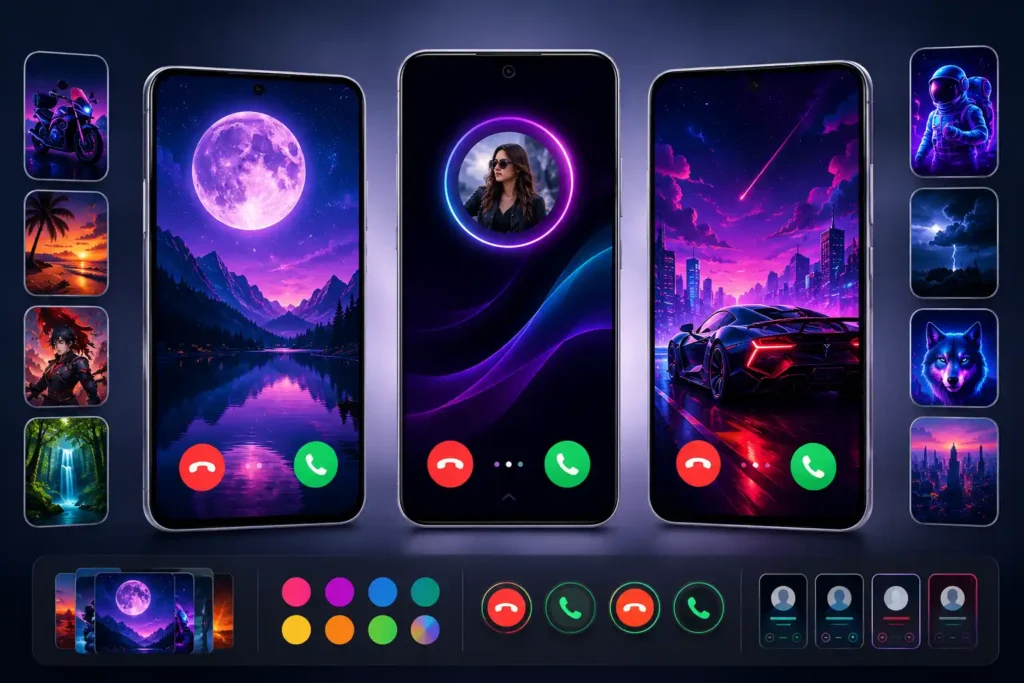
Changing a wallpaper is simple. Changing the screen that appears when somebody actually calls you is different.
That distinction is important when looking at Color Phone, Call Screen Theme, an Android personalization app from MixGroup. The app is currently listed on Google Play in the Personalization category and offers animated incoming-call designs, custom answer and decline buttons, DIY backgrounds, ringtones and flash alerts.
But the interesting question isn’t whether the screenshots look colorful. It is whether replacing the familiar incoming-call experience is useful enough to justify the additional setup, permissions, advertising and data considerations that can come with this type of app.
Quick Summary
15–30 second answer: Color Phone, Call Screen Theme is worth looking at mainly if you are bored with your Android phone’s standard incoming-call screen and want something visibly different.
Its most useful ideas go beyond simply putting a picture behind a call. Google Play says users can create call-screen backgrounds from their own photos or videos, change call-button styles, preview designs, use different themes for individual contacts, select ringtones and enable flash alerts.
There is an important trade-off, however: a call-screen customization app interacts with a much more functional part of the phone than an ordinary wallpaper does. Users should therefore pay attention to the permissions Android requests, whether the customized screen behaves reliably on their device, battery impact from animated designs, advertising and the app’s data-safety information.
Table of Contents
Why Call Screen Apps Are Different From Ordinary Wallpaper Apps
A normal wallpaper is mostly passive. You unlock the phone and look at it.
An incoming-call screen is an interaction surface.
When the phone rings, you may need to identify the caller, answer immediately, reject the call or react while the device is locked. That makes usability more important than visual appearance.
This creates a useful way to judge any Mobile Call Screen Theme app:
Does the customization make incoming calls better without making the basic act of answering a call worse?
That question is more valuable than simply counting how many themes an app provides.
For example, an elaborate animated design may look impressive during a preview but could be less practical if the caller information or answer controls become harder to recognize quickly.
Users should test functionality before deciding that a visually impressive theme is their permanent setup.
What Color Phone, Call Screen Theme Actually Changes
The Google Play listing describes several layers of customization rather than a single wallpaper feature.

Users can browse call-screen themes ranging from minimal styles to colorful, anime, neon, nature and 3D-style designs. The listing also says users can create a DIY call-screen wallpaper using their own photo or video.
That distinction matters.
A pre-made theme is mainly decoration. A DIY option can make the incoming-call experience genuinely personal—for example, using a preferred image or video rather than selecting another design from a theme catalogue.
The app also advertises customizable answer and decline button styles and a live preview before applying a design.
The preview feature is particularly practical. Incoming calls are not a good place to discover that a design looked attractive in a thumbnail but made important controls difficult to see.
One Overlooked Feature: Contact Recognition
One of the more interesting features is easy to miss among all the colorful screenshots.
The Google Play description says a different call-screen theme can be assigned to individual contacts.
That can turn personalization into a visual identification system.
A user could theoretically associate particular designs with family members or other frequently calling contacts. Instead of every caller triggering essentially the same visual experience, the screen itself provides an additional visual cue.
It shouldn’t replace reading the caller name or number, but this is a more functional use of themes than simply making every call look brighter.
Flash on Call May Be More Useful Than the Themes
Another feature deserves separate attention: Flash on Call.
According to the official listing, the app can use flash alerts as a visual indication of an incoming call.
That can be useful when the ringtone is difficult to hear, such as when a phone is sitting nearby in a noisy environment.
But users shouldn’t automatically leave it enabled everywhere.
A flashing light can be distracting in dark rooms, meetings or other situations where a visual alert is less appropriate. The sensible approach is to treat it as an optional notification feature rather than something that must be enabled simply because the app provides it.
The Real Test: What Happens When the Phone Is Locked?
This is an area users should pay more attention to than promotional screenshots.
After applying a theme, don’t judge it only from the app’s preview screen.
Lock the device and make a real test call from another phone.
Check:
- whether the caller’s identity remains easy to read;
- whether Answer and Decline controls are immediately understandable;
- whether the customized screen appears consistently;
- whether there is any noticeable delay;
- whether the experience remains usable with the phone locked;
- whether the phone returns normally after the call ends.
Android manufacturers heavily customize their software. A feature that behaves one way on one handset may not look or behave identically on another.
This makes a real incoming-call test more meaningful than screenshots or theme previews.
DIY Photos and Videos Need a Privacy Check Too
The ability to create a call screen from personal photos or videos sounds straightforward, but users should consider what they are displaying.
An incoming call can appear while a phone is sitting on a desk, in a workplace, inside a vehicle or around other people.
A private family photo that seems harmless as a customized call screen may therefore become visible whenever the device rings.
The same consideration applies to contact-specific designs.
So the question isn’t only:
“Which picture looks best?”
It is also:
“Am I comfortable with this appearing publicly whenever my phone rings?”
For lock-screen-adjacent personalization, that is an easily overlooked privacy consideration.
Permissions Deserve More Attention Than Theme Count
Call customization apps may need system access to deliver their core functions. The exact permission prompts a user sees can vary with Android version, device and enabled features.
Rather than automatically approving every request during setup, users should match each requested permission with a feature they actually intend to use.
For example, if a feature involves selecting personal media, some form of media access may be understandable. A flash-alert feature logically requires access related to the device’s camera flash.
The important principle is purpose-based permission checking.
If Android presents a permission and its relationship to the feature being enabled isn’t clear, stop and investigate before granting it.
Permissions can also be reviewed later from Android’s app settings.
What Google Play’s Data Safety Section Says
Privacy deserves a separate look because this isn’t simply an offline wallpaper image.
At the time checked, Google Play’s developer-provided Data safety section says the app may collect Location, App activity and two other data categories, and may share Location, App activity and two other categories with third parties. It also states that data is encrypted in transit and that data can’t be deleted.
That does not by itself establish that an app is unsafe. Google explicitly notes that Data safety information is supplied by developers and that practices can vary according to use, region and age.
It does mean privacy-conscious users have a reason to open the complete Data safety section before installation rather than assuming a personalization app handles no data.
This is especially relevant for someone who simply wants a prettier incoming-call screen and doesn’t expect personalization software to involve broader data practices.
Free Doesn’t Necessarily Mean Completely Free
Google Play currently labels the app as containing ads and in-app purchases.
That distinction should be understood before installing.
“Install” at no initial charge does not necessarily mean every theme, customization option or experience is provided without advertising or additional purchases.
Users should examine any purchase screen carefully before confirming it and check whether the specific designs or functionality they want are available without payment.
For younger family members using a shared payment method, purchase authentication is also worth checking.
Animated Call Themes Can Have a Different Cost: Resources
Live and animated themes naturally involve more visual processing than a static background.
That doesn’t mean this particular app will cause significant battery drain on every device. Such a claim would require controlled testing across hardware and usage conditions.
Instead, users can perform a simple practical comparison.
Use the app normally for a day or two and inspect Android’s battery usage page. If battery consumption noticeably changes, switch temporarily to a simpler or static design and compare.
This is particularly useful on older phones where additional animation and background activity may be more noticeable.
Interestingly, the developer describes the app as lightweight and battery-friendly. That remains a developer claim; individual device behavior is the more useful measure for users.
Don’t Confuse a Call Theme With Your Phone App
Another important distinction is terminology.
“Call screen,” “dialer,” and “Phone app” can sound interchangeable, but they don’t necessarily describe the same thing.
The principal appeal here is personalizing what an incoming call looks like.
Users looking for a complete replacement dialer, sophisticated spam-call filtering, business caller identification or advanced contact management should evaluate those requirements separately rather than assuming a visually customizable call screen automatically provides them.
This distinction can prevent users from installing the wrong category of app for the problem they are actually trying to solve.
Who Should Pay Attention?
Color Phone, Call Screen Theme makes the most sense for Android users who enjoy visual personalization and have already customized areas such as wallpapers, lock screens, widgets or icon layouts.
It may also appeal to people who want different visual cues for frequent contacts or find flash-based incoming-call alerts useful.
It is less compelling for someone who prefers Android’s default interface, minimizes third-party apps, dislikes advertising or prioritizes a simple and predictable incoming-call experience over visual customization.
What to Check Before Installing
First, install only through the official store listing rather than searching for unofficial APK copies. The current Google Play page identifies the app as Color Phone, Call Screen Theme by MixGroup.
Color Phone, Call Screen Theme on Google Play
Then check the Data safety details, requested permissions, in-app purchase terms and whether the features you want require additional access.
After installation, apply one theme and test an actual incoming call before spending time configuring multiple contacts.
That small test can reveal more about real-world compatibility than browsing dozens of themes.
What About the Latest Update?
Google Play shows that the app was updated on July 24, 2026. However, its public “What’s new” section only says that it is a new Color Phone update and does not provide a meaningful feature-by-feature changelog.
Therefore, it would be misleading to claim that the July update introduced a specific new feature unless MixGroup publishes more detailed release information.
Features such as DIY backgrounds, flash alerts, contact-specific themes and custom buttons are confirmed on the current listing, but the available official information does not establish exactly which release introduced each one.
That distinction is important when deciding whether something is genuinely “new” or simply part of the app’s current feature set.
Limitations and Concerns
The biggest limitation is that call-screen personalization depends heavily on how well it integrates with the user’s particular Android device.
Manufacturer-specific Android interfaces, permission restrictions and battery-management systems can affect third-party personalization apps.
There are also three practical compromises: the app contains advertising and in-app purchases; animated customization may be unnecessary for users prioritizing simplicity; and the developer-provided Google Play Data safety information deserves review before installation.
Most importantly, visual customization should never interfere with the basic job of a call screen: quickly showing who is calling and allowing the user to answer or decline.
Is Color Phone, Call Screen Theme Worth Trying?
Yes, for the right type of user—but test it rather than judging it from screenshots.
If you specifically want a customizable incoming-call experience, its combination of pre-made themes, DIY photo/video backgrounds, contact-specific designs, custom call buttons, ringtones and flash alerts provides several ways to experiment.
If you simply want a different wallpaper, installing an app that interacts with incoming-call presentation may be more functionality than you need.
The best approach is therefore simple: check permissions and Data safety first, apply one design, make a real test call, and keep it only if the customization improves the experience rather than merely making it busier.
FAQs
Is Color Phone, Call Screen Theme available now?
Yes. The app currently has an active Google Play listing for Android under MixGroup.
Is Color Phone, Call Screen Theme free?
Google Play provides an Install option, while also identifying the app as containing ads and in-app purchases. Some experiences may therefore involve advertising or optional paid content.
Can I use my own photo for a call screen?
The official description says users can use their own photos or videos when creating a DIY call-screen wallpaper.
Can I give different contacts different call themes?
The Google Play description says users can assign different call-screen themes to individual contacts.
Does it support flash alerts for incoming calls?
Yes. Flash on Call and incoming-call flash alerts are among the features described on the current official listing.
Is Color Phone, Call Screen Theme safe?
An app’s presence on Google Play should not be interpreted as a guarantee that it is suitable for every user’s privacy preferences. Google Play currently displays developer-provided information indicating collection and sharing of several data categories. Review the complete Data safety section and the permissions Android requests before deciding.
Is there an iPhone version?
The source examined for this article is the Google Play listing for the Android application. We have not confirmed an official iOS App Store version from the information used here, so iPhone availability should not be assumed.
What should I do immediately after installing it?
Apply a single theme and make a test call from another phone. Test it while your device is locked as well as unlocked. Confirm that caller information, Answer and Decline controls and normal call handling remain clear before configuring additional themes.
Final Takeaway
Color Phone, Call Screen Theme is more interesting when viewed as an incoming-call personalization layer rather than simply another wallpaper application.
The colorful designs are the obvious attraction, but contact-specific visual cues, DIY backgrounds and flash alerts may provide more practical value.
At the same time, incoming calls are a functional part of a smartphone. Reliability, readable caller information, permissions, privacy and straightforward answer controls matter more than animation.
For users interested in Call Screen Theme customization, the sensible decision isn’t based on the biggest theme collection. It is whether the customized experience remains fast, recognizable and comfortable during an actual phone call.
Editorial Disclosure
IndShorts.com publishes independent app news, update explainers, mobile technology guides, and informational content.
IndShorts.com is not affiliated with Google Play, the App Store, Google, Apple, MixGroup, or any app developer unless clearly stated.
App names, logos, trademarks, and brand names belong to their respective owners.
This article is based on publicly available information, the official Google Play listing where available, and independent editorial analysis. App features, pricing, availability, permissions, privacy disclosures and policies may change over time.
Readers should verify important details through official app-store listings or developer sources before installing, updating, purchasing or granting permissions.
Related Apps & Guides
Color Call Screen & Themes Apps for Android in 2026 [DESIGN CALL]
February 22, 2026 • Read MoreVARIOUS DESIGN Call Experience: Ultimate Color Phone & Ringtone App for Vibrant Call Themes, Cool Screen Effects, and Flash Alerts
July 21, 2025 • Read MoreCall Screen Edge Lighting & Border Colors
August 10, 2022 • Read More✍️ About the Author – M Raj
Every website article I write is for the benefit of users (viewers). I focus on fully meeting the needs of article visitors and ensuring they are satisfied. All articles are created following Google’s article policy (Publisher Center guidelines). To get in touch, email M Raj at mraj@indshorts.com.
🧾 Editorial Standards
For corrections or clarifications, contact M Raj: keyboardtamil17@gmail.com